<?xml version="1.0" encoding="utf-8"?>
<feed xmlns="http://www.w3.org/2005/Atom">
    <id>https://pr-13364--ui5-webcomponents-preview.netlify.app/blog</id>
    <title>UI5 Web Components Blog</title>
    <updated>2025-05-15T10:00:00.000Z</updated>
    <generator>https://github.com/jpmonette/feed</generator>
    <link rel="alternate" href="https://pr-13364--ui5-webcomponents-preview.netlify.app/blog"/>
    <subtitle>UI5 Web Components Blog</subtitle>
    <icon>https://pr-13364--ui5-webcomponents-preview.netlify.app/img/favicon.ico</icon>
    <entry>
        <title type="html"><![CDATA[The Table Web Component is Now Productive - Here's What's New]]></title>
        <id>https://pr-13364--ui5-webcomponents-preview.netlify.app/blog/productive-table-release</id>
        <link href="https://pr-13364--ui5-webcomponents-preview.netlify.app/blog/productive-table-release"/>
        <updated>2025-05-15T10:00:00.000Z</updated>
        <summary type="html"><![CDATA[After its half-year tenure as an experimental component since the release of UI5 Web Components 2.0, allowing us to gather feedback]]></summary>
        <content type="html"><![CDATA[<p>After its half-year tenure as an experimental component since the release of UI5 Web Components 2.0, allowing us to gather feedback
and improve the API, the Table component will finally leave its experimental state!</p>
<p>This blog will update you on why we've decided to take this path, the improvements and new features of the <code>ui5-table</code>.</p>
<h2 class="anchor anchorWithStickyNavbar_fF9Z" id="going-from-old-to-new">Going from Old to New<a href="https://pr-13364--ui5-webcomponents-preview.netlify.app/blog/productive-table-release#going-from-old-to-new" class="hash-link" aria-label="Direct link to Going from Old to New" title="Direct link to Going from Old to New">​</a></h2>
<p>Back in UI5 Web Components 1.x, the library already offered a Table component, which provided developers with capabilities to display
data in a tabular structure.</p>
<p>Upgrading to a new version gave us the chance to reassess and reimagine the Table component, allowing us to focus on three core points:</p>
<ul>
<li>Improved accessibility</li>
<li>Harmonization between the Web Component Table and UI5 Tables</li>
<li>Enhancements to existing APIs and incorporation of new ideas</li>
</ul>
<p>As providing a completely new component with a fresh and new API might lead to issues, we've decided to publish the Table in an experimental state.
This has given us the time to manifest the final API, but most importantly the chance to listen to your feedback and improve our API based on it.</p>
<p>Finally, thanks to your feedback, we removed the experimental state of the <code>ui5-table</code>.</p>
<h2 class="anchor anchorWithStickyNavbar_fF9Z" id="whats-new">What's New?<a href="https://pr-13364--ui5-webcomponents-preview.netlify.app/blog/productive-table-release#whats-new" class="hash-link" aria-label="Direct link to What's New?" title="Direct link to What's New?">​</a></h2>
<h3 class="anchor anchorWithStickyNavbar_fF9Z" id="table-and-aria-structure">Table and ARIA Structure<a href="https://pr-13364--ui5-webcomponents-preview.netlify.app/blog/productive-table-release#table-and-aria-structure" class="hash-link" aria-label="Direct link to Table and ARIA Structure" title="Direct link to Table and ARIA Structure">​</a></h3>
<p>We've revamped the structure of the <code>ui5-table</code> component. The new structure is heavily inspired by the HTML table, instead of having a dedicated <code>&lt;ui5-column&gt;</code>, you'll
define a <code>&lt;ui5-table-header-row&gt;</code>, which contains a <code>&lt;ui5-table-header-cell&gt;</code>:</p>
<table><tbody><tr><th>HTML Table</th><th>Web Component Table</th></tr><tr><td><div class="language-html codeBlockContainer_ZGJx theme-code-block" style="--prism-color:#393A34;--prism-background-color:#f6f8fa"><div class="codeBlockContent_qZBB"><pre tabindex="0" class="prism-code language-html codeBlock_TAPP thin-scrollbar" style="color:#393A34;background-color:#f6f8fa"><code class="codeBlockLines_AdAo"><span class="token-line" style="color:#393A34"><span class="token tag punctuation" style="color:#393A34">&lt;</span><span class="token tag" style="color:#00009f">table</span><span class="token tag punctuation" style="color:#393A34">&gt;</span><span class="token plain"></span><br></span><span class="token-line" style="color:#393A34"><span class="token plain">  </span><span class="token tag punctuation" style="color:#393A34">&lt;</span><span class="token tag" style="color:#00009f">tr</span><span class="token tag punctuation" style="color:#393A34">&gt;</span><span class="token plain"></span><br></span><span class="token-line" style="color:#393A34"><span class="token plain">    </span><span class="token tag punctuation" style="color:#393A34">&lt;</span><span class="token tag" style="color:#00009f">th</span><span class="token tag punctuation" style="color:#393A34">&gt;</span><span class="token plain">Column A</span><span class="token tag punctuation" style="color:#393A34">&lt;/</span><span class="token tag" style="color:#00009f">th</span><span class="token tag punctuation" style="color:#393A34">&gt;</span><span class="token plain"></span><br></span><span class="token-line" style="color:#393A34"><span class="token plain">    </span><span class="token tag punctuation" style="color:#393A34">&lt;</span><span class="token tag" style="color:#00009f">th</span><span class="token tag punctuation" style="color:#393A34">&gt;</span><span class="token plain">Column B</span><span class="token tag punctuation" style="color:#393A34">&lt;/</span><span class="token tag" style="color:#00009f">th</span><span class="token tag punctuation" style="color:#393A34">&gt;</span><span class="token plain"></span><br></span><span class="token-line" style="color:#393A34"><span class="token plain">  </span><span class="token tag punctuation" style="color:#393A34">&lt;/</span><span class="token tag" style="color:#00009f">tr</span><span class="token tag punctuation" style="color:#393A34">&gt;</span><span class="token plain"></span><br></span><span class="token-line" style="color:#393A34"><span class="token plain">  </span><span class="token tag punctuation" style="color:#393A34">&lt;</span><span class="token tag" style="color:#00009f">tr</span><span class="token tag punctuation" style="color:#393A34">&gt;</span><span class="token plain"></span><br></span><span class="token-line" style="color:#393A34"><span class="token plain">    </span><span class="token tag punctuation" style="color:#393A34">&lt;</span><span class="token tag" style="color:#00009f">td</span><span class="token tag punctuation" style="color:#393A34">&gt;</span><span class="token plain">Cell 1</span><span class="token tag punctuation" style="color:#393A34">&lt;/</span><span class="token tag" style="color:#00009f">td</span><span class="token tag punctuation" style="color:#393A34">&gt;</span><span class="token plain"></span><br></span><span class="token-line" style="color:#393A34"><span class="token plain">    </span><span class="token tag punctuation" style="color:#393A34">&lt;</span><span class="token tag" style="color:#00009f">td</span><span class="token tag punctuation" style="color:#393A34">&gt;</span><span class="token plain">Cell 2</span><span class="token tag punctuation" style="color:#393A34">&lt;/</span><span class="token tag" style="color:#00009f">td</span><span class="token tag punctuation" style="color:#393A34">&gt;</span><span class="token plain"></span><br></span><span class="token-line" style="color:#393A34"><span class="token plain">  </span><span class="token tag punctuation" style="color:#393A34">&lt;/</span><span class="token tag" style="color:#00009f">tr</span><span class="token tag punctuation" style="color:#393A34">&gt;</span><span class="token plain"></span><br></span><span class="token-line" style="color:#393A34"><span class="token plain"></span><span class="token tag punctuation" style="color:#393A34">&lt;/</span><span class="token tag" style="color:#00009f">table</span><span class="token tag punctuation" style="color:#393A34">&gt;</span><br></span></code></pre><div class="buttonGroup_TNwR"><button type="button" aria-label="Copy code to clipboard" title="Copy" class="clean-btn"><span class="copyButtonIcons_MVhB" aria-hidden="true"><svg viewBox="0 0 24 24" class="copyButtonIcon_yxgH"><path fill="currentColor" d="M19,21H8V7H19M19,5H8A2,2 0 0,0 6,7V21A2,2 0 0,0 8,23H19A2,2 0 0,0 21,21V7A2,2 0 0,0 19,5M16,1H4A2,2 0 0,0 2,3V17H4V3H16V1Z"></path></svg><svg viewBox="0 0 24 24" class="copyButtonSuccessIcon_QJLJ"><path fill="currentColor" d="M21,7L9,19L3.5,13.5L4.91,12.09L9,16.17L19.59,5.59L21,7Z"></path></svg></span></button></div></div></div></td><td><div class="language-html codeBlockContainer_ZGJx theme-code-block" style="--prism-color:#393A34;--prism-background-color:#f6f8fa"><div class="codeBlockContent_qZBB"><pre tabindex="0" class="prism-code language-html codeBlock_TAPP thin-scrollbar" style="color:#393A34;background-color:#f6f8fa"><code class="codeBlockLines_AdAo"><span class="token-line" style="color:#393A34"><span class="token tag punctuation" style="color:#393A34">&lt;</span><span class="token tag" style="color:#00009f">ui5-table</span><span class="token tag punctuation" style="color:#393A34">&gt;</span><span class="token plain"></span><br></span><span class="token-line" style="color:#393A34"><span class="token plain">  </span><span class="token tag punctuation" style="color:#393A34">&lt;</span><span class="token tag" style="color:#00009f">ui5-table-header-row</span><span class="token tag" style="color:#00009f"> </span><span class="token tag attr-name" style="color:#00a4db">slot</span><span class="token tag attr-value punctuation attr-equals" style="color:#393A34">=</span><span class="token tag attr-value punctuation" style="color:#393A34">"</span><span class="token tag attr-value" style="color:#e3116c">headerRow</span><span class="token tag attr-value punctuation" style="color:#393A34">"</span><span class="token tag punctuation" style="color:#393A34">&gt;</span><span class="token plain"></span><br></span><span class="token-line" style="color:#393A34"><span class="token plain">    </span><span class="token tag punctuation" style="color:#393A34">&lt;</span><span class="token tag" style="color:#00009f">ui5-table-header-cell</span><span class="token tag punctuation" style="color:#393A34">&gt;</span><span class="token plain">Column A</span><span class="token tag punctuation" style="color:#393A34">&lt;/</span><span class="token tag" style="color:#00009f">ui5-table-header-cell</span><span class="token tag punctuation" style="color:#393A34">&gt;</span><span class="token plain"></span><br></span><span class="token-line" style="color:#393A34"><span class="token plain">    </span><span class="token tag punctuation" style="color:#393A34">&lt;</span><span class="token tag" style="color:#00009f">ui5-table-header-cell</span><span class="token tag punctuation" style="color:#393A34">&gt;</span><span class="token plain">Column B</span><span class="token tag punctuation" style="color:#393A34">&lt;/</span><span class="token tag" style="color:#00009f">ui5-table-header-cell</span><span class="token tag punctuation" style="color:#393A34">&gt;</span><span class="token plain"></span><br></span><span class="token-line" style="color:#393A34"><span class="token plain">  </span><span class="token tag punctuation" style="color:#393A34">&lt;/</span><span class="token tag" style="color:#00009f">ui5-table-header-row</span><span class="token tag punctuation" style="color:#393A34">&gt;</span><span class="token plain"></span><br></span><span class="token-line" style="color:#393A34"><span class="token plain">  </span><span class="token tag punctuation" style="color:#393A34">&lt;</span><span class="token tag" style="color:#00009f">ui5-table-row</span><span class="token tag punctuation" style="color:#393A34">&gt;</span><span class="token plain"></span><br></span><span class="token-line" style="color:#393A34"><span class="token plain">    </span><span class="token tag punctuation" style="color:#393A34">&lt;</span><span class="token tag" style="color:#00009f">ui5-table-cell</span><span class="token tag punctuation" style="color:#393A34">&gt;</span><span class="token plain">Cell 1</span><span class="token tag punctuation" style="color:#393A34">&lt;/</span><span class="token tag" style="color:#00009f">ui5-table-cell</span><span class="token tag punctuation" style="color:#393A34">&gt;</span><span class="token plain"></span><br></span><span class="token-line" style="color:#393A34"><span class="token plain">    </span><span class="token tag punctuation" style="color:#393A34">&lt;</span><span class="token tag" style="color:#00009f">ui5-table-cell</span><span class="token tag punctuation" style="color:#393A34">&gt;</span><span class="token plain">Cell 2</span><span class="token tag punctuation" style="color:#393A34">&lt;/</span><span class="token tag" style="color:#00009f">ui5-table-cell</span><span class="token tag punctuation" style="color:#393A34">&gt;</span><span class="token plain"></span><br></span><span class="token-line" style="color:#393A34"><span class="token plain">  </span><span class="token tag punctuation" style="color:#393A34">&lt;/</span><span class="token tag" style="color:#00009f">ui5-table-row</span><span class="token tag punctuation" style="color:#393A34">&gt;</span><span class="token plain"></span><br></span><span class="token-line" style="color:#393A34"><span class="token plain"></span><span class="token tag punctuation" style="color:#393A34">&lt;/</span><span class="token tag" style="color:#00009f">ui5-table</span><span class="token tag punctuation" style="color:#393A34">&gt;</span><br></span></code></pre><div class="buttonGroup_TNwR"><button type="button" aria-label="Copy code to clipboard" title="Copy" class="clean-btn"><span class="copyButtonIcons_MVhB" aria-hidden="true"><svg viewBox="0 0 24 24" class="copyButtonIcon_yxgH"><path fill="currentColor" d="M19,21H8V7H19M19,5H8A2,2 0 0,0 6,7V21A2,2 0 0,0 8,23H19A2,2 0 0,0 21,21V7A2,2 0 0,0 19,5M16,1H4A2,2 0 0,0 2,3V17H4V3H16V1Z"></path></svg><svg viewBox="0 0 24 24" class="copyButtonSuccessIcon_QJLJ"><path fill="currentColor" d="M21,7L9,19L3.5,13.5L4.91,12.09L9,16.17L19.59,5.59L21,7Z"></path></svg></span></button></div></div></div></td></tr></tbody></table>
<p>We've also decided to apply ARIA roles, such as "row" or "gridcell", directly to the Web Components instead of hiding them in the Shadow DOM, applying
the semantics directly to the component.
This change in combination with the new structure enables a better accessibility and screen reader support, as the new Table component now structurally
and semantically resembles the HTML table, ensuring an easier processing for assistive  technologies.</p>
<h3 class="anchor anchorWithStickyNavbar_fF9Z" id="keyboard-handling">Keyboard Handling<a href="https://pr-13364--ui5-webcomponents-preview.netlify.app/blog/productive-table-release#keyboard-handling" class="hash-link" aria-label="Direct link to Keyboard Handling" title="Direct link to Keyboard Handling">​</a></h3>
<p>Apart from moving the ARIA roles from the Shadow DOM to the "light" DOM, allowing you to directly reference other components (except for the table root) via <code>aria-labelledby</code>, accessibility
has been greatly improved in other areas as well.</p>
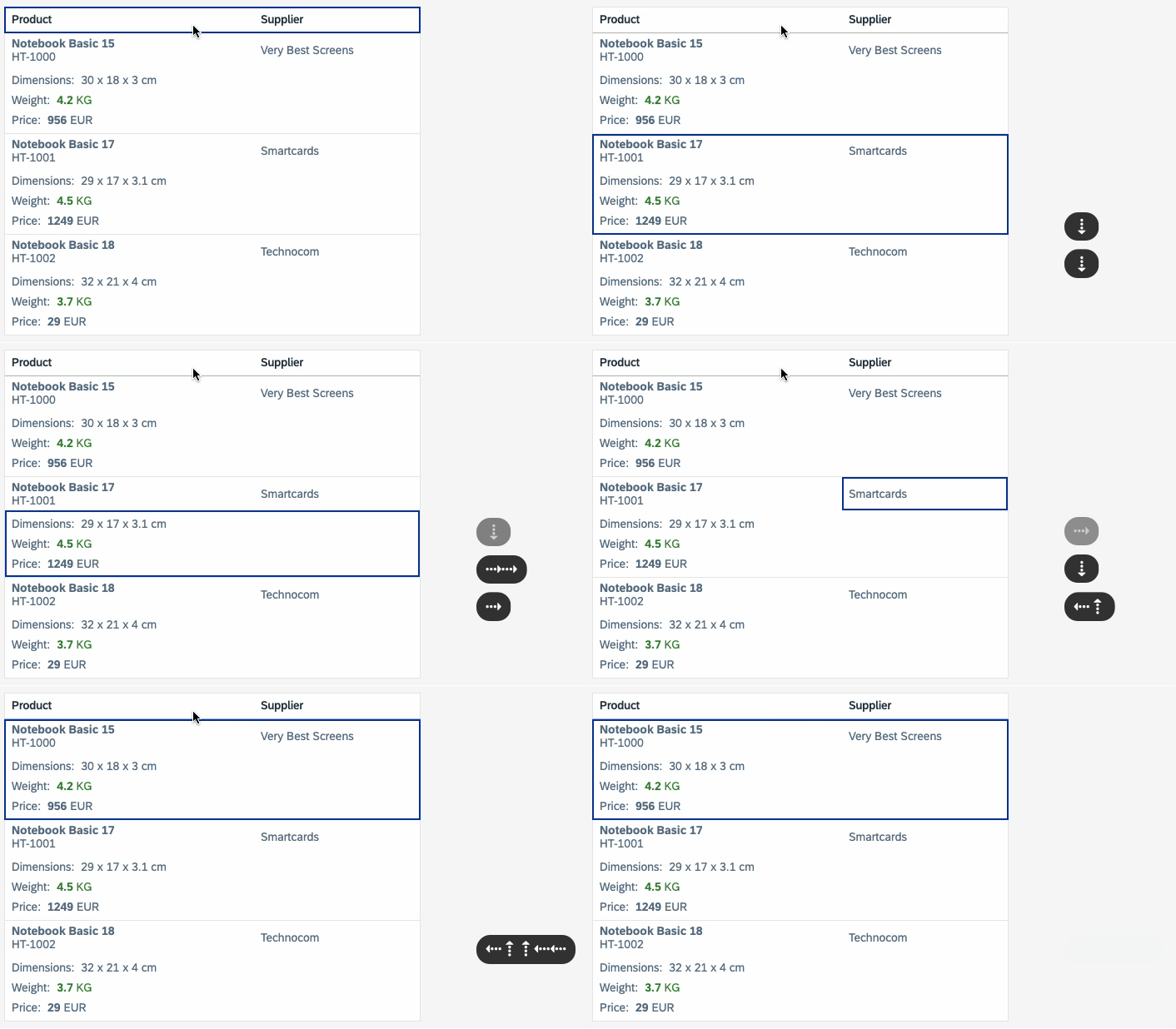
<p>One major change you might notice is the updated keyboard handling for the table. While previously you were only able to navigate through the table row by row, the
newly implemented keyboard specification allows you to navigate row by row <strong>and</strong> from cell to cell. This update aligns the Table component with its counterparts
in UI5 in terms of keyboard handling.</p>
<p><img decoding="async" loading="lazy" alt="Keyboard Handling" src="https://pr-13364--ui5-webcomponents-preview.netlify.app/assets/images/keyboard_handling-dabaebb50b6ea41e53f8306c512dff28.gif" width="706" height="412" class="img__Ss2"></p>
<p>Check the <a href="https://help.sap.com/docs/SAPUI5/bc5a64aac808463baa95b4230f221716/10c137d404874350b886cc988aa63c1c.html?locale=en-US" target="_blank" rel="noopener noreferrer">SAPUI5 Accessibility for End Users</a> for more information
about the handling.</p>
<h3 class="anchor anchorWithStickyNavbar_fF9Z" id="feature-concept">Feature Concept<a href="https://pr-13364--ui5-webcomponents-preview.netlify.app/blog/productive-table-release#feature-concept" class="hash-link" aria-label="Direct link to Feature Concept" title="Direct link to Feature Concept">​</a></h3>
<p>If you use the new <code>ui5-table</code> for the first time, you might notice that "core features" of the former Table implementation might be missing, such as growing capabilities or
selection functionality.</p>
<p>This discrepancy is intended as we wanted to provide a lightweight component for users that might not need such features.</p>
<p>If you require selection or growing capabilities, you can extend your Table component by assigning <em>Features</em> to it. The core idea of a <em>Feature</em> is to provide a
plug-and-play option for more complex features of the Table. This allows you to keep the Table as lightweight as possible ensuring only necessary
code/functionality is being used.</p>
<p>The <code>ui5-table</code> has a dedicated <code>features</code> slot to enable certain features, which are dedicated components. We are currently offering the following features:
<a href="https://ui5.github.io/webcomponents/components/TableSelectionSingle/" target="_blank" rel="noopener noreferrer">TableSelectionSingle</a>, <a href="https://ui5.github.io/webcomponents/components/TableSelectionMulti/" target="_blank" rel="noopener noreferrer">TableSelectionMulti</a>,
<a href="https://ui5.github.io/webcomponents/components/TableGrowing/" target="_blank" rel="noopener noreferrer">TableGrowing</a>, and <a href="https://ui5.github.io/webcomponents/components/TableVirtualizer/" target="_blank" rel="noopener noreferrer">TableVirtualizer</a>.</p>
<div class="language-html codeBlockContainer_ZGJx theme-code-block" style="--prism-color:#393A34;--prism-background-color:#f6f8fa"><div class="codeBlockContent_qZBB"><pre tabindex="0" class="prism-code language-html codeBlock_TAPP thin-scrollbar" style="color:#393A34;background-color:#f6f8fa"><code class="codeBlockLines_AdAo"><span class="token-line" style="color:#393A34"><span class="token tag punctuation" style="color:#393A34">&lt;</span><span class="token tag" style="color:#00009f">ui5-table</span><span class="token tag punctuation" style="color:#393A34">&gt;</span><span class="token plain"></span><br></span><span class="token-line" style="color:#393A34"><span class="token plain">  ...</span><br></span><span class="token-line" style="color:#393A34"><span class="token plain">  </span><span class="token tag punctuation" style="color:#393A34">&lt;</span><span class="token tag" style="color:#00009f">ui5-table-selection-single</span><span class="token tag" style="color:#00009f"> </span><span class="token tag attr-name" style="color:#00a4db">slot</span><span class="token tag attr-value punctuation attr-equals" style="color:#393A34">=</span><span class="token tag attr-value punctuation" style="color:#393A34">"</span><span class="token tag attr-value" style="color:#e3116c">features</span><span class="token tag attr-value punctuation" style="color:#393A34">"</span><span class="token tag" style="color:#00009f"> </span><span class="token tag punctuation" style="color:#393A34">/&gt;</span><span class="token plain"></span><br></span><span class="token-line" style="color:#393A34"><span class="token plain">  </span><span class="token tag punctuation" style="color:#393A34">&lt;</span><span class="token tag" style="color:#00009f">ui5-table-growing</span><span class="token tag" style="color:#00009f"> </span><span class="token tag attr-name" style="color:#00a4db">slot</span><span class="token tag attr-value punctuation attr-equals" style="color:#393A34">=</span><span class="token tag attr-value punctuation" style="color:#393A34">"</span><span class="token tag attr-value" style="color:#e3116c">features</span><span class="token tag attr-value punctuation" style="color:#393A34">"</span><span class="token tag" style="color:#00009f"> </span><span class="token tag punctuation" style="color:#393A34">/&gt;</span><span class="token plain"></span><br></span><span class="token-line" style="color:#393A34"><span class="token plain">  </span><span class="token tag punctuation" style="color:#393A34">&lt;</span><span class="token tag" style="color:#00009f">ui5-table-virtualizer</span><span class="token tag" style="color:#00009f"> </span><span class="token tag attr-name" style="color:#00a4db">slot</span><span class="token tag attr-value punctuation attr-equals" style="color:#393A34">=</span><span class="token tag attr-value punctuation" style="color:#393A34">"</span><span class="token tag attr-value" style="color:#e3116c">features</span><span class="token tag attr-value punctuation" style="color:#393A34">"</span><span class="token tag" style="color:#00009f"> </span><span class="token tag punctuation" style="color:#393A34">/&gt;</span><span class="token plain"></span><br></span><span class="token-line" style="color:#393A34"><span class="token plain"></span><span class="token tag punctuation" style="color:#393A34">&lt;/</span><span class="token tag" style="color:#00009f">ui5-table</span><span class="token tag punctuation" style="color:#393A34">&gt;</span><br></span></code></pre><div class="buttonGroup_TNwR"><button type="button" aria-label="Copy code to clipboard" title="Copy" class="clean-btn"><span class="copyButtonIcons_MVhB" aria-hidden="true"><svg viewBox="0 0 24 24" class="copyButtonIcon_yxgH"><path fill="currentColor" d="M19,21H8V7H19M19,5H8A2,2 0 0,0 6,7V21A2,2 0 0,0 8,23H19A2,2 0 0,0 21,21V7A2,2 0 0,0 19,5M16,1H4A2,2 0 0,0 2,3V17H4V3H16V1Z"></path></svg><svg viewBox="0 0 24 24" class="copyButtonSuccessIcon_QJLJ"><path fill="currentColor" d="M21,7L9,19L3.5,13.5L4.91,12.09L9,16.17L19.59,5.59L21,7Z"></path></svg></span></button></div></div></div>
<h4 class="anchor anchorWithStickyNavbar_fF9Z" id="selection-feature">Selection Feature<a href="https://pr-13364--ui5-webcomponents-preview.netlify.app/blog/productive-table-release#selection-feature" class="hash-link" aria-label="Direct link to Selection Feature" title="Direct link to Selection Feature">​</a></h4>
<p>As you may have noticed, there are now <strong>two</strong> selection features: <code>TableSelectionSingle</code> and <code>TableSelectionMulti</code>. Instead of a single, unified selection feature, we chose to separate
them to keep the API lean, clean, and better suited to their respective use cases. This approach also helps manage complexity as each selection mode has distinct API requirements
and behaviors.</p>
<p>Additionally, selection is no longer handled at the row level. Previously, <code>ui5-table-row</code> had a <code>selected</code> property, but this has been removed. Instead, selection is now decoupled from
the table, and the selection feature itself maintains a <code>selected</code> property containing the keys of selected rows. To enable this, you need to provide a <code>row-key</code> for your rows to uniquely
identify them.</p>
<p>For an example implementation, see <a href="https://ui5.github.io/webcomponents/components/TableSelectionMulti/#basic-sample" target="_blank" rel="noopener noreferrer">here</a>.</p>
<h4 class="anchor anchorWithStickyNavbar_fF9Z" id="growing-feature">Growing Feature<a href="https://pr-13364--ui5-webcomponents-preview.netlify.app/blog/productive-table-release#growing-feature" class="hash-link" aria-label="Direct link to Growing Feature" title="Direct link to Growing Feature">​</a></h4>
<p>In addtion to revamping the selection behavior, we've decided to improve and adapt the growing behavior as well. <code>TableGrowing</code> enables growing capabilities and provides two different
growing modes:</p>
<ul>
<li><code>Button</code>: Renders a button to load more data</li>
<li><code>Scroll</code>: Scrolls to the bottom of the table to load more data</li>
</ul>
<p>We have slightly improved the <code>Scroll</code> behavior: If the table is not scrollable yet, the growing button will be rendered until the table is scrollable. This will always ensure
that the table offers its growing capabilities when using <code>TableGrowing</code>.</p>
<p>You can check these samples to see implementations of both growing modes:</p>
<ul>
<li><a href="https://ui5.github.io/webcomponents/nightly/components/TableGrowing/#growing-with-a-button" target="_blank" rel="noopener noreferrer">Growing with a Button</a></li>
<li><a href="https://ui5.github.io/webcomponents/nightly/components/TableGrowing/#growing-with-scrolling" target="_blank" rel="noopener noreferrer">Growing with Scrolling</a></li>
</ul>
<h4 class="anchor anchorWithStickyNavbar_fF9Z" id="virtualization">Virtualization<a href="https://pr-13364--ui5-webcomponents-preview.netlify.app/blog/productive-table-release#virtualization" class="hash-link" aria-label="Direct link to Virtualization" title="Direct link to Virtualization">​</a></h4>
<p><code>TableVirtualizer</code> is a new feature that is currently still experimental. Its main purpose is to virtualize table rows, allowing you to display huge amounts of data without rendering
everything straight to the browser compromising performance.</p>
<p>This feature ensures that only the rows visible in the current viewport are rendered and updated during scrolling. To achieve this, the <code>TableVirtualizer</code> offers a
<code>range-change</code> event allowing you to exchange or update the row contexts and contents accordingly.</p>
<p>A sample implementation can be found <a href="https://ui5.github.io/webcomponents/components/TableVirtualizer/#basic-sample" target="_blank" rel="noopener noreferrer">here</a>.</p>
<p><img decoding="async" loading="lazy" alt="Example of the Virtualizer" src="https://pr-13364--ui5-webcomponents-preview.netlify.app/assets/images/virtualizer-826e504a46f2c9153362d50f956d7e10.gif" width="930" height="140" class="img__Ss2"></p>
<h3 class="anchor anchorWithStickyNavbar_fF9Z" id="new-functionalities">New Functionalities<a href="https://pr-13364--ui5-webcomponents-preview.netlify.app/blog/productive-table-release#new-functionalities" class="hash-link" aria-label="Direct link to New Functionalities" title="Direct link to New Functionalities">​</a></h3>
<h4 class="anchor anchorWithStickyNavbar_fF9Z" id="overflow-mode">Overflow Mode<a href="https://pr-13364--ui5-webcomponents-preview.netlify.app/blog/productive-table-release#overflow-mode" class="hash-link" aria-label="Direct link to Overflow Mode" title="Direct link to Overflow Mode">​</a></h4>
<p>The old Table component used the popin mode by default, a responsive display option optimal for small screen sizes. Defining a <code>minWidth</code> for the column, a minimum table width,
allows the column to move into the popin area  if the table is smaller than the specified <code>minWidth</code>.</p>
<p>This overall behavior has changed now with the new <code>ui5-table</code>.</p>
<p>First of all, the Table component introduces the <code>overflowMode</code>. This property allows you to switch between popin mode and horizontal scrolling, giving you flexibility
with the overflow behavior of your table.</p>
<p>Furthermore, the "popin configuration" has changed. Instead of defining a <code>minWidth</code> representing the "minimum table width", you can define <code>width</code> or <code>minWidth</code> for the
column itself. If the table overflows, the columns that overflow, for example,  if they don't fit into the table anymore, will be moved into the "popin area". This is a more natural
overflow behavior allowing you to just define the widths of your columns without worrying about the general table width.</p>
<p>See <a href="https://ui5.github.io/webcomponents/components/Table/#overflow-mode" target="_blank" rel="noopener noreferrer">here</a> for a sample.</p>
<h4 class="anchor anchorWithStickyNavbar_fF9Z" id="row-actions">Row Actions<a href="https://pr-13364--ui5-webcomponents-preview.netlify.app/blog/productive-table-release#row-actions" class="hash-link" aria-label="Direct link to Row Actions" title="Direct link to Row Actions">​</a></h4>
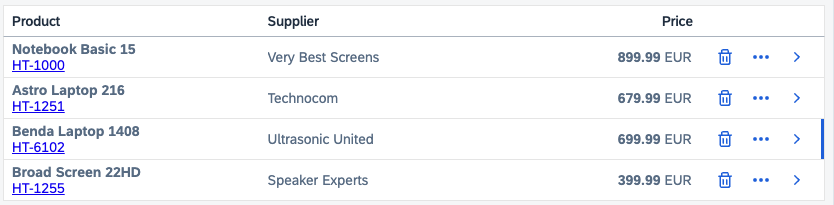
<p>The <code>ui5-table</code> introduces row actions. The <code>ui5-table-row</code> has a dedicated <code>actions</code> slot, which allows you to add custom row actions to your rows.</p>
<p>There are two row action options:</p>
<ul>
<li>Use <a href="https://ui5.github.io/webcomponents/components/TableRowActionNavigation/" target="_blank" rel="noopener noreferrer"><code>TableRowActionNavigation</code></a> to define a navigation action.</li>
<li>Use <a href="https://ui5.github.io/webcomponents/components/TableRowAction/" target="_blank" rel="noopener noreferrer"><code>TableRowAction</code></a> to define a custom navigation. Provide a text and icon for your custom action.</li>
</ul>
<div class="language-html codeBlockContainer_ZGJx theme-code-block" style="--prism-color:#393A34;--prism-background-color:#f6f8fa"><div class="codeBlockContent_qZBB"><pre tabindex="0" class="prism-code language-html codeBlock_TAPP thin-scrollbar" style="color:#393A34;background-color:#f6f8fa"><code class="codeBlockLines_AdAo"><span class="token-line" style="color:#393A34"><span class="token tag punctuation" style="color:#393A34">&lt;</span><span class="token tag" style="color:#00009f">ui5-table-row</span><span class="token tag" style="color:#00009f"> </span><span class="token tag attr-name" style="color:#00a4db">row-key</span><span class="token tag attr-value punctuation attr-equals" style="color:#393A34">=</span><span class="token tag attr-value punctuation" style="color:#393A34">"</span><span class="token tag attr-value" style="color:#e3116c">2</span><span class="token tag attr-value punctuation" style="color:#393A34">"</span><span class="token tag punctuation" style="color:#393A34">&gt;</span><span class="token plain"></span><br></span><span class="token-line" style="color:#393A34"><span class="token plain">  </span><span class="token tag punctuation" style="color:#393A34">&lt;</span><span class="token tag" style="color:#00009f">ui5-table-cell</span><span class="token tag punctuation" style="color:#393A34">&gt;</span><span class="token tag punctuation" style="color:#393A34">&lt;</span><span class="token tag" style="color:#00009f">ui5-label</span><span class="token tag punctuation" style="color:#393A34">&gt;</span><span class="token tag punctuation" style="color:#393A34">&lt;</span><span class="token tag" style="color:#00009f">b</span><span class="token tag punctuation" style="color:#393A34">&gt;</span><span class="token plain">Astro Laptop 216</span><span class="token tag punctuation" style="color:#393A34">&lt;/</span><span class="token tag" style="color:#00009f">b</span><span class="token tag punctuation" style="color:#393A34">&gt;</span><span class="token tag punctuation" style="color:#393A34">&lt;</span><span class="token tag" style="color:#00009f">br</span><span class="token tag punctuation" style="color:#393A34">&gt;</span><span class="token tag punctuation" style="color:#393A34">&lt;</span><span class="token tag" style="color:#00009f">a</span><span class="token tag" style="color:#00009f"> </span><span class="token tag attr-name" style="color:#00a4db">href</span><span class="token tag attr-value punctuation attr-equals" style="color:#393A34">=</span><span class="token tag attr-value punctuation" style="color:#393A34">"</span><span class="token tag attr-value" style="color:#e3116c">#</span><span class="token tag attr-value punctuation" style="color:#393A34">"</span><span class="token tag punctuation" style="color:#393A34">&gt;</span><span class="token plain">HT-1251</span><span class="token tag punctuation" style="color:#393A34">&lt;/</span><span class="token tag" style="color:#00009f">a</span><span class="token tag punctuation" style="color:#393A34">&gt;</span><span class="token tag punctuation" style="color:#393A34">&lt;/</span><span class="token tag" style="color:#00009f">ui5-label</span><span class="token tag punctuation" style="color:#393A34">&gt;</span><span class="token tag punctuation" style="color:#393A34">&lt;/</span><span class="token tag" style="color:#00009f">ui5-table-cell</span><span class="token tag punctuation" style="color:#393A34">&gt;</span><span class="token plain"></span><br></span><span class="token-line" style="color:#393A34"><span class="token plain">  </span><span class="token tag punctuation" style="color:#393A34">&lt;</span><span class="token tag" style="color:#00009f">ui5-table-row-action</span><span class="token tag" style="color:#00009f"> </span><span class="token tag attr-name" style="color:#00a4db">slot</span><span class="token tag attr-value punctuation attr-equals" style="color:#393A34">=</span><span class="token tag attr-value punctuation" style="color:#393A34">"</span><span class="token tag attr-value" style="color:#e3116c">actions</span><span class="token tag attr-value punctuation" style="color:#393A34">"</span><span class="token tag" style="color:#00009f"> </span><span class="token tag attr-name" style="color:#00a4db">icon</span><span class="token tag attr-value punctuation attr-equals" style="color:#393A34">=</span><span class="token tag attr-value punctuation" style="color:#393A34">"</span><span class="token tag attr-value" style="color:#e3116c">delete</span><span class="token tag attr-value punctuation" style="color:#393A34">"</span><span class="token tag" style="color:#00009f"> </span><span class="token tag attr-name" style="color:#00a4db">text</span><span class="token tag attr-value punctuation attr-equals" style="color:#393A34">=</span><span class="token tag attr-value punctuation" style="color:#393A34">"</span><span class="token tag attr-value" style="color:#e3116c">Delete</span><span class="token tag attr-value punctuation" style="color:#393A34">"</span><span class="token tag" style="color:#00009f"> </span><span class="token tag attr-name" style="color:#00a4db">handler</span><span class="token tag attr-value punctuation attr-equals" style="color:#393A34">=</span><span class="token tag attr-value punctuation" style="color:#393A34">"</span><span class="token tag attr-value" style="color:#e3116c">onDelete</span><span class="token tag attr-value punctuation" style="color:#393A34">"</span><span class="token tag punctuation" style="color:#393A34">&gt;</span><span class="token tag punctuation" style="color:#393A34">&lt;/</span><span class="token tag" style="color:#00009f">ui5-table-row-action</span><span class="token tag punctuation" style="color:#393A34">&gt;</span><span class="token plain"></span><br></span><span class="token-line" style="color:#393A34"><span class="token plain">  </span><span class="token tag punctuation" style="color:#393A34">&lt;</span><span class="token tag" style="color:#00009f">ui5-table-row-action-navigation</span><span class="token tag" style="color:#00009f"> </span><span class="token tag attr-name" style="color:#00a4db">slot</span><span class="token tag attr-value punctuation attr-equals" style="color:#393A34">=</span><span class="token tag attr-value punctuation" style="color:#393A34">"</span><span class="token tag attr-value" style="color:#e3116c">actions</span><span class="token tag attr-value punctuation" style="color:#393A34">"</span><span class="token tag" style="color:#00009f"> </span><span class="token tag attr-name" style="color:#00a4db">handler</span><span class="token tag attr-value punctuation attr-equals" style="color:#393A34">=</span><span class="token tag attr-value punctuation" style="color:#393A34">"</span><span class="token tag attr-value" style="color:#e3116c">onNavigate</span><span class="token tag attr-value punctuation" style="color:#393A34">"</span><span class="token tag" style="color:#00009f"> </span><span class="token tag attr-name" style="color:#00a4db">interactive</span><span class="token tag punctuation" style="color:#393A34">&gt;</span><span class="token tag punctuation" style="color:#393A34">&lt;/</span><span class="token tag" style="color:#00009f">ui5-table-row-action-navigation</span><span class="token tag punctuation" style="color:#393A34">&gt;</span><span class="token plain"></span><br></span><span class="token-line" style="color:#393A34"><span class="token plain"></span><span class="token tag punctuation" style="color:#393A34">&lt;/</span><span class="token tag" style="color:#00009f">ui5-table-row</span><span class="token tag punctuation" style="color:#393A34">&gt;</span><br></span></code></pre><div class="buttonGroup_TNwR"><button type="button" aria-label="Copy code to clipboard" title="Copy" class="clean-btn"><span class="copyButtonIcons_MVhB" aria-hidden="true"><svg viewBox="0 0 24 24" class="copyButtonIcon_yxgH"><path fill="currentColor" d="M19,21H8V7H19M19,5H8A2,2 0 0,0 6,7V21A2,2 0 0,0 8,23H19A2,2 0 0,0 21,21V7A2,2 0 0,0 19,5M16,1H4A2,2 0 0,0 2,3V17H4V3H16V1Z"></path></svg><svg viewBox="0 0 24 24" class="copyButtonSuccessIcon_QJLJ"><path fill="currentColor" d="M21,7L9,19L3.5,13.5L4.91,12.09L9,16.17L19.59,5.59L21,7Z"></path></svg></span></button></div></div></div>
<p><img decoding="async" loading="lazy" alt="Row Actions Sample" src="https://pr-13364--ui5-webcomponents-preview.netlify.app/assets/images/row_actions-5228bc5d4c06e3a92af1451741b7bc87.png" width="834" height="205" class="img__Ss2"></p>
<h4 class="anchor anchorWithStickyNavbar_fF9Z" id="drag-and-drop">Drag And Drop<a href="https://pr-13364--ui5-webcomponents-preview.netlify.app/blog/productive-table-release#drag-and-drop" class="hash-link" aria-label="Direct link to Drag And Drop" title="Direct link to Drag And Drop">​</a></h4>
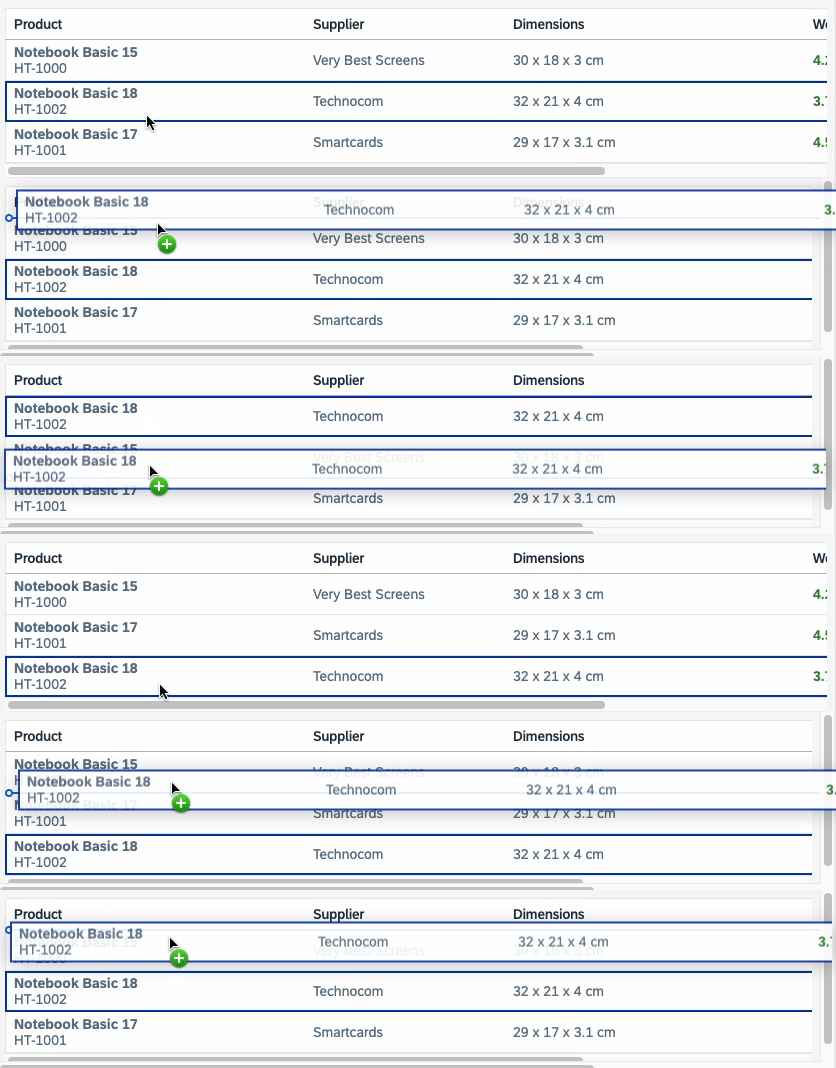
<p>The Table component is now drag-and-drop-enabled! By utilizing the Table's <code>move-over</code> and <code>move</code> event, you can now move around table rows.</p>
<p>This allows you to implement features such as row reordering, exchanging data between tables, and many more.</p>
<p><img decoding="async" loading="lazy" alt="Drag And Drop" src="https://pr-13364--ui5-webcomponents-preview.netlify.app/assets/images/drag_drop-094fb0e05a3ea0ac001e7ac415791f65.gif" width="836" height="178" class="img__Ss2"></p>
<h2 class="anchor anchorWithStickyNavbar_fF9Z" id="summary">Summary<a href="https://pr-13364--ui5-webcomponents-preview.netlify.app/blog/productive-table-release#summary" class="hash-link" aria-label="Direct link to Summary" title="Direct link to Summary">​</a></h2>
<p>The <code>ui5-table</code> and its related components (except for <code>TableVirtualizer</code>) are finally "graduating" from their experimental state and will move into a stable state.
The new table offers new and improved features, accessibility and user experience.</p>
<p>For compatibility reasons, the old table is still available in the <code>compat</code> package, but please migrate to the new table implementation to leverage the newest
features and functionalities.</p>
<p>If you are interested in learning more about the <code>ui5-table</code>, check out the <a href="https://ui5.github.io/webcomponents/components/Table/" target="_blank" rel="noopener noreferrer">documentation</a>, or join
us at <a href="https://openui5.org/ui5con/" target="_blank" rel="noopener noreferrer">UI5con</a>!</p>]]></content>
        <category label="table" term="table"/>
        <category label="experimental" term="experimental"/>
    </entry>
    <entry>
        <title type="html"><![CDATA[Introducing JSX for web component templates]]></title>
        <id>https://pr-13364--ui5-webcomponents-preview.netlify.app/blog/introducing-jsx</id>
        <link href="https://pr-13364--ui5-webcomponents-preview.netlify.app/blog/introducing-jsx"/>
        <updated>2025-01-07T10:00:00.000Z</updated>
        <summary type="html"><![CDATA[We are proud to announce that the 2.6.0 release of the web components adds support for using JSX templates.]]></summary>
        <content type="html"><![CDATA[<p>We are proud to announce that the 2.6.0 release of the web components adds support for using <a href="https://github.com/UI5/webcomponents/pull/10046" target="_blank" rel="noopener noreferrer">JSX templates</a>.</p>
<p>Until now, Handlebars was the only templating language that could be used. The main goal of the project since the beginning was to have declarative renderers, and Handlebars served this purpose well. There were some drawbacks however.</p>
<h2 class="anchor anchorWithStickyNavbar_fF9Z" id="own-hbs-compiler">Own HBS compiler<a href="https://pr-13364--ui5-webcomponents-preview.netlify.app/blog/introducing-jsx#own-hbs-compiler" class="hash-link" aria-label="Direct link to Own HBS compiler" title="Direct link to Own HBS compiler">​</a></h2>
<p>Since handlebars originally works with strings only and cannot update the DOM effectively, we had to build our own HBS -&gt; lit-html compiler. This added some technical debt, as not all features from Handlebars were implemented. It also added maintenance effort for a tool we had to update and evolve, when switching to TypeScript for example, or when encountering edge cases not previously considered.</p>
<h2 class="anchor anchorWithStickyNavbar_fF9Z" id="development-experience">Development experience<a href="https://pr-13364--ui5-webcomponents-preview.netlify.app/blog/introducing-jsx#development-experience" class="hash-link" aria-label="Direct link to Development experience" title="Direct link to Development experience">​</a></h2>
<p>All templating languages are by default not understood by IDEs out of the box.</p>
<p>Code completion is the biggest gap we were seeing - there was simply no way to tell the IDE what to do without writing a plugin, which would be further development effort.</p>
<p>While we added type checking (the compiled HBS code is in a <code>.ts</code> file so there is some typechecking), it was never complete - type errors are shown in the console, not in the IDE. They were also only top level property type checks - no typechecks inside loops, no typechecks for events and event handlers.</p>
<p>Code navigation was also missing - you could not click on a property in a HBS template to navigate to the property definition in the component itself.</p>
<h2 class="anchor anchorWithStickyNavbar_fF9Z" id="jsx">JSX<a href="https://pr-13364--ui5-webcomponents-preview.netlify.app/blog/introducing-jsx#jsx" class="hash-link" aria-label="Direct link to JSX" title="Direct link to JSX">​</a></h2>
<p>JSX is an embeddable HTML-like syntax that gets transformed into JavaScript. It is written inside JavaScript and transformed to JavaScript, which means the TypeScript compiler can do all of the things it does out of the box - not only typechecking, but also provide code completion suggestions and do the code transformation. IDEs also have TypeScript integration, so nothing additional is required.</p>
<h2 class="anchor anchorWithStickyNavbar_fF9Z" id="jsx-benefits-compared-to-hbs-templates">JSX benefits compared to HBS templates<a href="https://pr-13364--ui5-webcomponents-preview.netlify.app/blog/introducing-jsx#jsx-benefits-compared-to-hbs-templates" class="hash-link" aria-label="Direct link to JSX benefits compared to HBS templates" title="Direct link to JSX benefits compared to HBS templates">​</a></h2>
<p>What follows is a quick summary of all improvements offered by JSX.</p>
<h3 class="anchor anchorWithStickyNavbar_fF9Z" id="declarative-️">Declarative ↔️<a href="https://pr-13364--ui5-webcomponents-preview.netlify.app/blog/introducing-jsx#declarative-%EF%B8%8F" class="hash-link" aria-label="Direct link to Declarative ↔️" title="Direct link to Declarative ↔️">​</a></h3>
<p>No change here, both are declarative.</p>
<h3 class="anchor anchorWithStickyNavbar_fF9Z" id="type-checking-️">Type checking ↗️<a href="https://pr-13364--ui5-webcomponents-preview.netlify.app/blog/introducing-jsx#type-checking-%EF%B8%8F" class="hash-link" aria-label="Direct link to Type checking ↗️" title="Direct link to Type checking ↗️">​</a></h3>
<p>Full type checking - not only top-level properties, but also loops, events, event handlers, and code in the template as well.</p>
<h3 class="anchor anchorWithStickyNavbar_fF9Z" id="code-completion-️">Code completion ↗️<a href="https://pr-13364--ui5-webcomponents-preview.netlify.app/blog/introducing-jsx#code-completion-%EF%B8%8F" class="hash-link" aria-label="Direct link to Code completion ↗️" title="Direct link to Code completion ↗️">​</a></h3>
<p>Full code completion - TypeScript knows exactly what properties are available for each tag, and what their respective values are. Type errors are shown in the IDE and quick fixes also work out of the box.</p>
<h3 class="anchor anchorWithStickyNavbar_fF9Z" id="code-navigation-️">Code navigation ↗️<a href="https://pr-13364--ui5-webcomponents-preview.netlify.app/blog/introducing-jsx#code-navigation-%EF%B8%8F" class="hash-link" aria-label="Direct link to Code navigation ↗️" title="Direct link to Code navigation ↗️">​</a></h3>
<p>Using Cmd-Click on a property name or an event handler directly jumps to the code location in the component. This was not possible before.</p>
<h3 class="anchor anchorWithStickyNavbar_fF9Z" id="debugging-templates-️">Debugging templates ↗️<a href="https://pr-13364--ui5-webcomponents-preview.netlify.app/blog/introducing-jsx#debugging-templates-%EF%B8%8F" class="hash-link" aria-label="Direct link to Debugging templates ↗️" title="Direct link to Debugging templates ↗️">​</a></h3>
<p>While it was possible to debug lit-html templates, they were big horizontal lines of template literal code and actually kind of hard to debug. JSX templates look like function calls with whitespaces and show a much better structure that is easier to debug.</p>
<h3 class="anchor anchorWithStickyNavbar_fF9Z" id="no-ide-plugin-needed-️">No IDE plugin needed ↗️<a href="https://pr-13364--ui5-webcomponents-preview.netlify.app/blog/introducing-jsx#no-ide-plugin-needed-%EF%B8%8F" class="hash-link" aria-label="Direct link to No IDE plugin needed ↗️" title="Direct link to No IDE plugin needed ↗️">​</a></h3>
<p>All of the benefits above come without the need to write a plugin - IDEs are already integrated with TypeScript that provides all of the above features for free.</p>
<h3 class="anchor anchorWithStickyNavbar_fF9Z" id="no-new-tooling-️">No new tooling ↗️<a href="https://pr-13364--ui5-webcomponents-preview.netlify.app/blog/introducing-jsx#no-new-tooling-%EF%B8%8F" class="hash-link" aria-label="Direct link to No new tooling ↗️" title="Direct link to No new tooling ↗️">​</a></h3>
<p>Transforming the template to JavaScript code is handled by the TypeScript compiler. There is absolutely no new code for the transformation step.</p>
<h3 class="anchor anchorWithStickyNavbar_fF9Z" id="smaller-template-size-️">Smaller template size ↗️<a href="https://pr-13364--ui5-webcomponents-preview.netlify.app/blog/introducing-jsx#smaller-template-size-%EF%B8%8F" class="hash-link" aria-label="Direct link to Smaller template size ↗️" title="Direct link to Smaller template size ↗️">​</a></h3>
<p>Converting all of the <code>main</code> and <code>fiori</code> components (~140) reduced the gzip size of the bundle by roughly 20 kB.</p>
<h2 class="anchor anchorWithStickyNavbar_fF9Z" id="technical-aspects">Technical aspects<a href="https://pr-13364--ui5-webcomponents-preview.netlify.app/blog/introducing-jsx#technical-aspects" class="hash-link" aria-label="Direct link to Technical aspects" title="Direct link to Technical aspects">​</a></h2>
<p>The JSX transformation creates a Virtual DOM, and the actual DOM updates are handled by <a href="https://preactjs.com/" target="_blank" rel="noopener noreferrer">Preact</a>. Preact has a big focus on performance and is very fast and small. Virtual DOM is theoretically slower when updating big lists (as their templates have to be rendered and the diff has to be run), but for the web components, this is not a problem, since the items of the components are coming from the applications and the component only renders a slot where the items will appear.</p>
<h2 class="anchor anchorWithStickyNavbar_fF9Z" id="summary">Summary<a href="https://pr-13364--ui5-webcomponents-preview.netlify.app/blog/introducing-jsx#summary" class="hash-link" aria-label="Direct link to Summary" title="Direct link to Summary">​</a></h2>
<p>The switch to JSX improves the web component development experience immensely. Not only is the development experience better, but in the process of migrating the existing components, a lot of bugs were caught that were simply missed in HBS. Size improvements and the good performance make this a real good step for the framework and for component developers.</p>
<p>For more implementation details, you can check the <a href="https://ui5.github.io/webcomponents/docs/development/templates/" target="_blank" rel="noopener noreferrer">template docs</a> and the <a href="https://github.com/UI5/webcomponents/pull/10046" target="_blank" rel="noopener noreferrer">PR</a></p>]]></content>
        <category label="jsx" term="jsx"/>
        <category label="template" term="template"/>
    </entry>
    <entry>
        <title type="html"><![CDATA[Announcing UI5 Web Components 2.0! A New Era Begins!]]></title>
        <id>https://pr-13364--ui5-webcomponents-preview.netlify.app/blog/releases/announcing-v2</id>
        <link href="https://pr-13364--ui5-webcomponents-preview.netlify.app/blog/releases/announcing-v2"/>
        <updated>2024-07-03T10:00:00.000Z</updated>
        <summary type="html"><![CDATA[A Journey of Innovation and Growth]]></summary>
        <content type="html"><![CDATA[<h2 class="anchor anchorWithStickyNavbar_fF9Z" id="a-journey-of-innovation-and-growth">A Journey of Innovation and Growth<a href="https://pr-13364--ui5-webcomponents-preview.netlify.app/blog/releases/announcing-v2#a-journey-of-innovation-and-growth" class="hash-link" aria-label="Direct link to A Journey of Innovation and Growth" title="Direct link to A Journey of Innovation and Growth">​</a></h2>
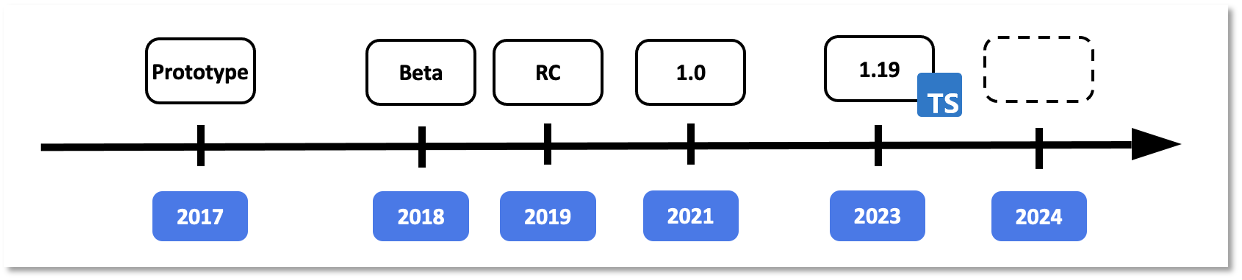
<p>Since the release of UI5 Web Components 1.0 in 2021, our journey has been marked by unwavering innovation and a commitment to excellence. Over the past three years, we have listened to our community, refined our technologies, and expanded our capabilities.</p>
<p><img decoding="async" loading="lazy" alt="UI5 Web Components timeline" src="https://pr-13364--ui5-webcomponents-preview.netlify.app/assets/images/ui5webcomponents_timeline-1602f431dde12d8bad50959a4a86430f.png" width="1242" height="280" class="img__Ss2"></p>
<p>Our project has continuously evolved, embracing new web standards, eliminating legacy code, and integrating invaluable user feedback from our community to enhance our APIs. This journey culminated in April with the unveiling of the first Release Candidate for UI5 Web Components 2.0.</p>
<h2 class="anchor anchorWithStickyNavbar_fF9Z" id="announcing-ui5-web-components-20-">Announcing UI5 Web Components 2.0! 🎉<a href="https://pr-13364--ui5-webcomponents-preview.netlify.app/blog/releases/announcing-v2#announcing-ui5-web-components-20-" class="hash-link" aria-label="Direct link to Announcing UI5 Web Components 2.0! 🎉" title="Direct link to Announcing UI5 Web Components 2.0! 🎉">​</a></h2>
<p>Today, we stand at a pivotal moment in our evolution with the official launch of UI5 Web Components 2.0. This major release marks a new era, enhancing performance and reliability while setting the stage for future innovations. Our commitment to growth and providing cutting-edge tools for web development ensures we continue to meet the evolving needs of our community.</p>
<p><strong>Key Benefits of UI5 Web Components 2.0</strong></p>
<p>UI5 Web Components 2.0 introduces several substantial improvements:</p>
<ul>
<li>
<p>Embracing New Standards: Future-proofing UI5 Web Components.</p>
</li>
<li>
<p>Consistent APIs: Streamlined and more intuitive, albeit with some breaking changes.</p>
</li>
<li>
<p>Elimination of Legacy Code: Reducing footprint and enhancing quality by minimizing bugs.</p>
</li>
</ul>
<p>Looking ahead, we will adhere to Semantic Versioning and release major updates more frequently to keep pace with technological advancements.</p>
<h2 class="anchor anchorWithStickyNavbar_fF9Z" id="whats-new-in-ui5-web-components-20">What's New in UI5 Web Components 2.0?<a href="https://pr-13364--ui5-webcomponents-preview.netlify.app/blog/releases/announcing-v2#whats-new-in-ui5-web-components-20" class="hash-link" aria-label="Direct link to What's New in UI5 Web Components 2.0?" title="Direct link to What's New in UI5 Web Components 2.0?">​</a></h2>
<h3 class="anchor anchorWithStickyNavbar_fF9Z" id="revolutionary-popover-api"><strong>Revolutionary Popover API</strong><a href="https://pr-13364--ui5-webcomponents-preview.netlify.app/blog/releases/announcing-v2#revolutionary-popover-api" class="hash-link" aria-label="Direct link to revolutionary-popover-api" title="Direct link to revolutionary-popover-api">​</a></h3>
<p>Experience a standardized, consistent, and flexible mechanism for displaying popover content across all relevant components.<br>
<!-- -->This API allows popups to display correctly above all other content, eliminating the need for the "static area" used in version 1.x. Previously, popups were placed in a static area within the body to ensure correct positioning despite various CSS rules. In version 2.x, the <a href="https://developer.mozilla.org/en-US/docs/Web/HTML/Global_attributes/popover" target="_blank" rel="noopener noreferrer">popover API</a> simplifies the DOM structure by incorporating the popover directly within the component. This results in easier development, maintenance, and enhanced styling capabilities. It also allows components with popups to have physical children, supporting custom content and simplifying testing. The popover API is fully supported by all major browsers. Discover all the practical benefits in our <a href="https://ui5.github.io/webcomponents/nightly/blog/releases/popover-api-in-v2/" target="_blank" rel="noopener noreferrer">blog post</a>.</p>
<h3 class="anchor anchorWithStickyNavbar_fF9Z" id="form-associated-custom-elements"><strong>Form-Associated Custom Elements</strong><a href="https://pr-13364--ui5-webcomponents-preview.netlify.app/blog/releases/announcing-v2#form-associated-custom-elements" class="hash-link" aria-label="Direct link to form-associated-custom-elements" title="Direct link to form-associated-custom-elements">​</a></h3>
<p>Harness the power of native input behavior within HTML forms. This enhancement makes the features/InputElementsFormSupport.js feature redundant, simplifying form handling and enhancing the developer experience. Refer to the <a href="https://developer.mozilla.org/en-US/docs/Web/API/ElementInternals" target="_blank" rel="noopener noreferrer">ElementInternals API documentation</a> for more details.</p>
<h3 class="anchor anchorWithStickyNavbar_fF9Z" id="seamless-time-zone-support"><strong>Seamless Time Zone Support</strong><a href="https://pr-13364--ui5-webcomponents-preview.netlify.app/blog/releases/announcing-v2#seamless-time-zone-support" class="hash-link" aria-label="Direct link to seamless-time-zone-support" title="Direct link to seamless-time-zone-support">​</a></h3>
<p>Seamlessly manage time zones within your applications for a more personalized user experience. The date and time components are adapted to the time zone feature, allowing the components to present dates in different time zones. The time zone identifiers format is the one used in the IANA time zone database. See a <a href="https://ui5.github.io/webcomponents/nightly/components/DateTimePicker/#timezones" target="_blank" rel="noopener noreferrer">sample</a> on our website.</p>
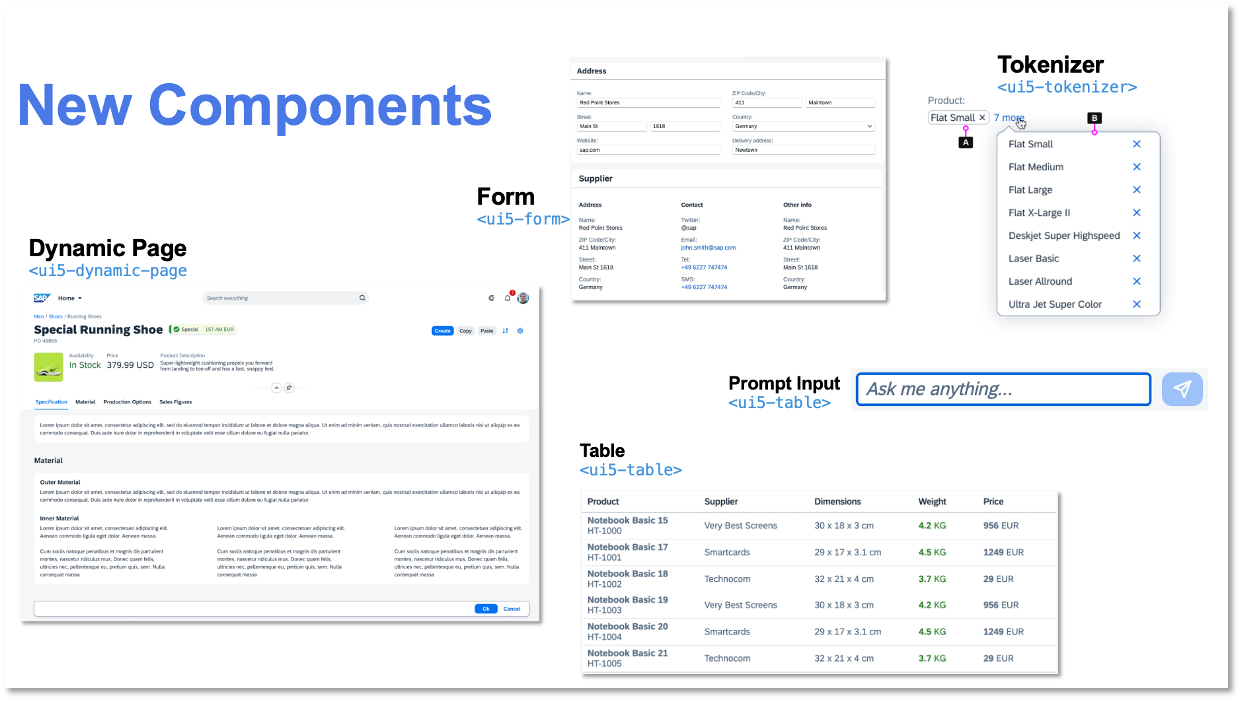
<h3 class="anchor anchorWithStickyNavbar_fF9Z" id="new-components"><strong>New Components</strong><a href="https://pr-13364--ui5-webcomponents-preview.netlify.app/blog/releases/announcing-v2#new-components" class="hash-link" aria-label="Direct link to new-components" title="Direct link to new-components">​</a></h3>
<p>Expand your UI toolkit with new components such as Dynamic Page, Form, Table, Text, Tokenizer, AI Button, and AI Prompt Input.</p>
<ul>
<li><a href="https://ui5.github.io/webcomponents/nightly/components/fiori/DynamicPage/" target="_blank" rel="noopener noreferrer">Dynamic Page</a>: A layout component, representing a web page, consisting of a title, a header with dynamic behavior, a content area, and an optional floating footer. Use the Dynamic Page if you need to have a title, that is always visible and a header, that has configurable Expanding/Snapping functionality.</li>
<li><a href="https://ui5.github.io/webcomponents/nightly/components/Form/" target="_blank" rel="noopener noreferrer">Form</a>: The <code>ui5-form</code> is a layout component that arranges labels and form fields (like input fields) pairs into a specific number of columns. And, there is also "grouping" available to assist the implementation of richer UIs. The Form component reacts and changes its layout on predefined breakpoints.</li>
<li><a href="https://ui5.github.io/webcomponents/nightly/components/Table/" target="_blank" rel="noopener noreferrer">Table</a>: The <code>ui5-table</code> component provides a set of sophisticated features for displaying and dealing with vast amounts of data in a responsive manner. This Table replaces the previous Table web component, that has been part of @ui5/webcomponents version 1.x. For compatibility reasons, we moved the previous Table implementation to the <code>@ui5/webcomponents-compat</code> package and will be maintained until the new Table is experimental.</li>
<li><a href="https://ui5.github.io/webcomponents/nightly/components/Text/" target="_blank" rel="noopener noreferrer">Text</a>: The <code>ui5-text</code> component displays text that can be used in any content area of an application. By default, the text will wrap when the space is not enough. In addition, the component supports truncation via the max-lines property, which defines the number of lines the text should wrap before it starts truncating.</li>
<li><a href="https://ui5.github.io/webcomponents/nightly/components/Tokenizer/" target="_blank" rel="noopener noreferrer">Tokenizer</a>: A <code>ui5-tokenizer</code> is an invisible container for <code>ui5-tokens</code> that supports keyboard navigation and token selection.</li>
<li><a href="https://ui5.github.io/webcomponents/nightly/components/ai/Button/" target="_blank" rel="noopener noreferrer">AI Button</a>: The <code>ui5-ai-button</code> component represents a button used in AI-related scenarios. It enables users to trigger actions by clicking or tapping the ui5-ai-button, or by pressing certain keyboard keys, such as Enter.</li>
<li><a href="https://ui5.github.io/webcomponents/nightly/components/ai/PromptInput/" target="_blank" rel="noopener noreferrer">AI Prompt Input</a>: The <code>ui5-ai-prompt-input</code> component allows the user to write custom instructions in natural language so that AI is guided to generate content tailored to user needs.</li>
<li><a href="https://ui5.github.io/webcomponents/nightly/components/OptionCustom/" target="_blank" rel="noopener noreferrer">Custom Option</a>: The <code>ui5-option-custom</code> component defines a custom content of an option in the <code>ui5-select</code>. The component accepts arbitrary HTML content to allow full customization.</li>
<li><a href="https://ui5.github.io/webcomponents/nightly/components/SuggestionItemCustom/" target="_blank" rel="noopener noreferrer">Custom Suggestion Item</a>: The <code>ui5-suggestion-item-custom</code> is a type of suggestion item, that can be used to place suggestion items with custom content in the input.</li>
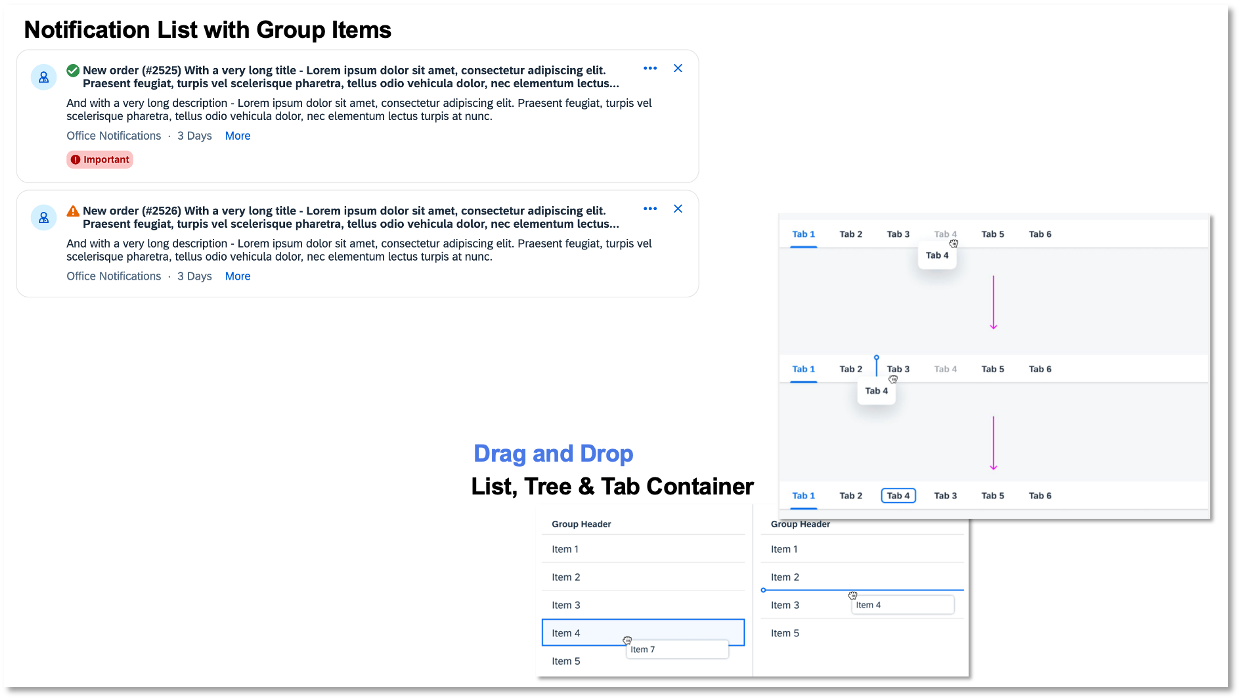
<li><a href="https://ui5.github.io/webcomponents/nightly/components/fiori/NotificationList/" target="_blank" rel="noopener noreferrer">Notification List</a>: The <code>ui5-notification-list</code> web component acts as a container for <code>ui5-li-notification-group</code> and <code>ui5-li-notification</code>, delivering the new SAP Design Notification experience.</li>
<li><a href="https://ui5.github.io/webcomponents/nightly/components/ListItemGroup/" target="_blank" rel="noopener noreferrer">List Group</a>: The <code>ui5-li-group</code> is a special list item used exclusively for creating groups of list items within a <code>ui5-list</code>.</li>
</ul>
<p><img decoding="async" loading="lazy" alt="Preview of UI5 Web Components 2.0 new components" src="https://pr-13364--ui5-webcomponents-preview.netlify.app/assets/images/new_components_v2-31e9fef6eba2af379de1aaf42170ce94.png" width="1242" height="702" class="img__Ss2"></p>
<h3 class="anchor anchorWithStickyNavbar_fF9Z" id="enhanced-existing-components"><strong>Enhanced Existing Components</strong><a href="https://pr-13364--ui5-webcomponents-preview.netlify.app/blog/releases/announcing-v2#enhanced-existing-components" class="hash-link" aria-label="Direct link to enhanced-existing-components" title="Direct link to enhanced-existing-components">​</a></h3>
<p>Benefit from improvements in List Drag and Drop, Tree Drag and Drop, Tab Container Drag and Drop, and a revamped Notifications Experience.</p>
<p><img decoding="async" loading="lazy" alt="Preview of UI5 Web Components 2.0 new features" src="https://pr-13364--ui5-webcomponents-preview.netlify.app/assets/images/new_features_v2-a90c2faec19524bf2fcbfa123ae33e38.png" width="1242" height="700" class="img__Ss2"></p>
<div class="theme-admonition theme-admonition-note admonition_IZjC alert alert--secondary"><div class="admonitionHeading_uVvU"><span class="admonitionIcon_HiR3"><svg viewBox="0 0 14 16"><path fill-rule="evenodd" d="M6.3 5.69a.942.942 0 0 1-.28-.7c0-.28.09-.52.28-.7.19-.18.42-.28.7-.28.28 0 .52.09.7.28.18.19.28.42.28.7 0 .28-.09.52-.28.7a1 1 0 0 1-.7.3c-.28 0-.52-.11-.7-.3zM8 7.99c-.02-.25-.11-.48-.31-.69-.2-.19-.42-.3-.69-.31H6c-.27.02-.48.13-.69.31-.2.2-.3.44-.31.69h1v3c.02.27.11.5.31.69.2.2.42.31.69.31h1c.27 0 .48-.11.69-.31.2-.19.3-.42.31-.69H8V7.98v.01zM7 2.3c-3.14 0-5.7 2.54-5.7 5.68 0 3.14 2.56 5.7 5.7 5.7s5.7-2.55 5.7-5.7c0-3.15-2.56-5.69-5.7-5.69v.01zM7 .98c3.86 0 7 3.14 7 7s-3.14 7-7 7-7-3.12-7-7 3.14-7 7-7z"></path></svg></span>note</div><div class="admonitionContent_bl22"><p>For the full list of changes, please refer to the release <a href="https://github.com/UI5/webcomponents/releases" target="_blank" rel="noopener noreferrer">change log</a>.</p></div></div>
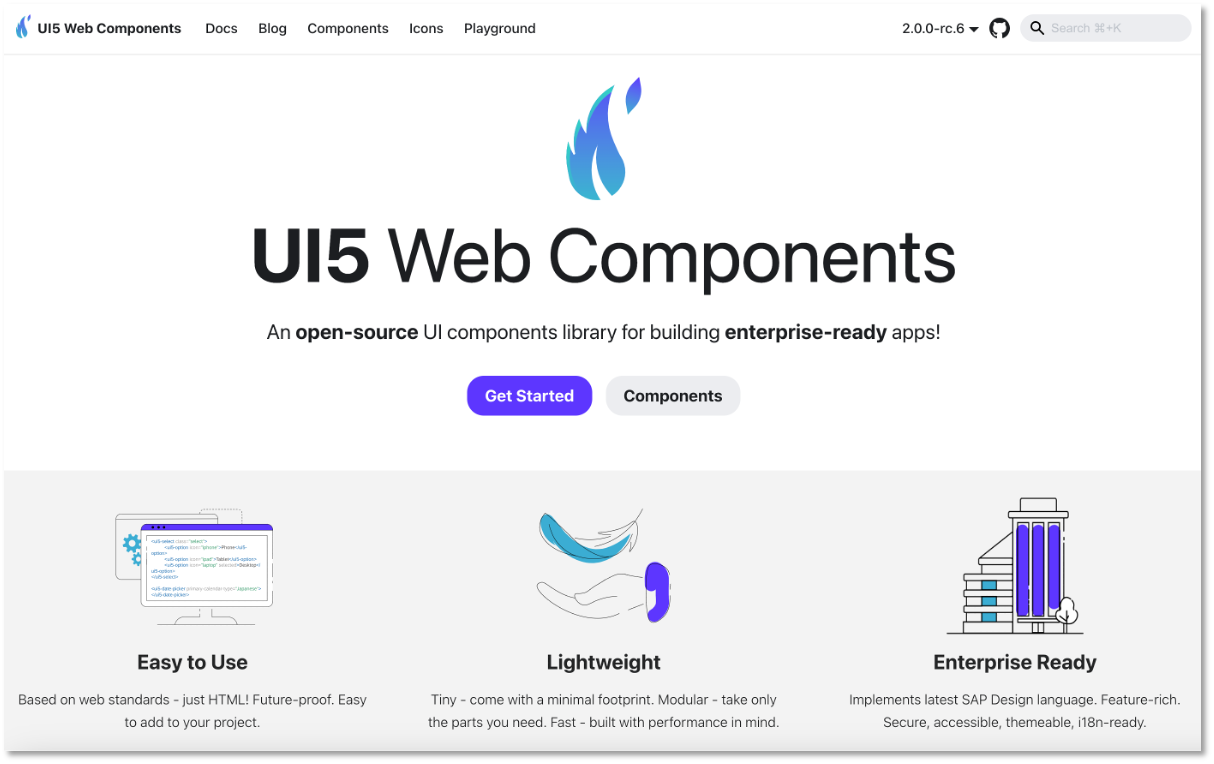
<h3 class="anchor anchorWithStickyNavbar_fF9Z" id="revamped-documentation-site"><strong>Revamped Documentation Site</strong><a href="https://pr-13364--ui5-webcomponents-preview.netlify.app/blog/releases/announcing-v2#revamped-documentation-site" class="hash-link" aria-label="Direct link to revamped-documentation-site" title="Direct link to revamped-documentation-site">​</a></h3>
<p>Explore our new documentation site featuring a live editor, playground, dark mode, and an intuitive icons view.</p>
<p><img decoding="async" loading="lazy" alt="UI5 Web Components 2.0 new website" src="https://pr-13364--ui5-webcomponents-preview.netlify.app/assets/images/website-316e6be097a954a9a7366fe1661a3d3b.png" width="1214" height="764" class="img__Ss2"></p>
<p><strong>New logo</strong>: We are excited to introduce our new symbol and branding, reflecting the modern and dynamic nature of our project. Our new design incorporates defining elements of the feather and the flame. The feather symbolizes being lightweight, while the flame forms a connection to the phoenix, embodying the spirit of rebirth and continuous improvement.</p>
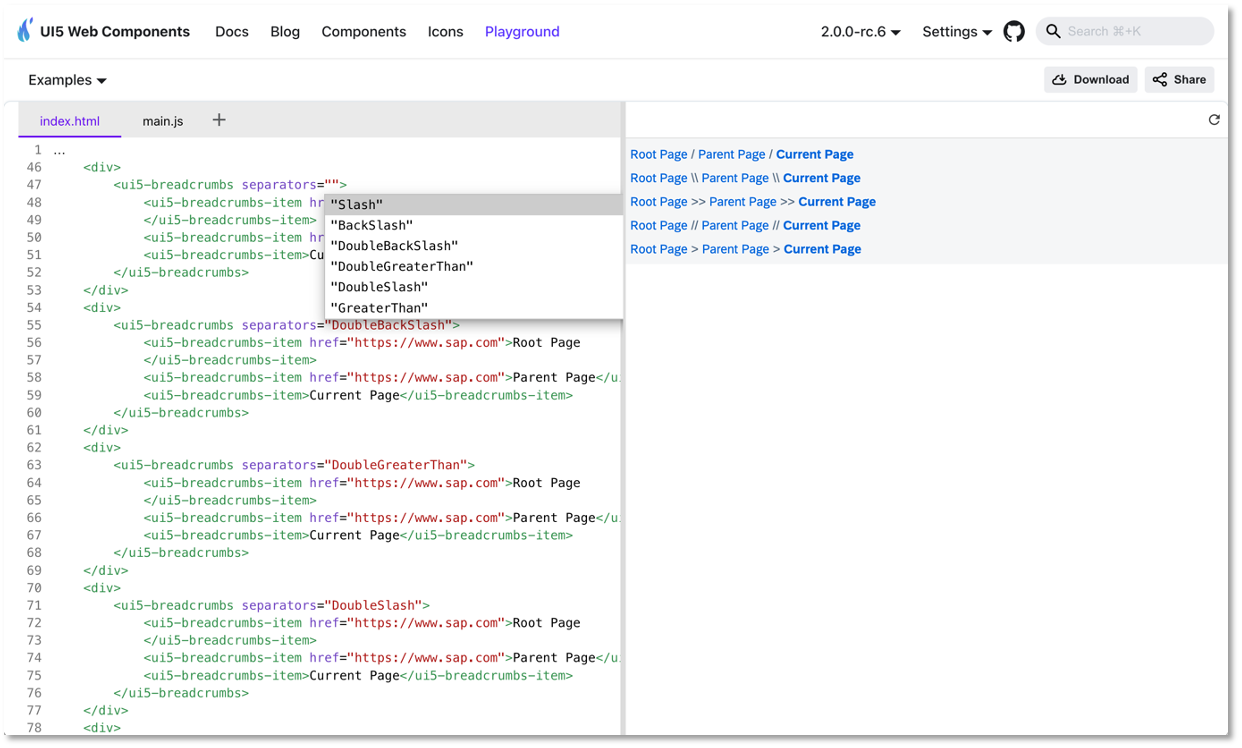
<p><strong>Explore the Full-Screen Playground</strong></p>
<p>Our new <a href="https://ui5.github.io/webcomponents/nightly/play/" target="_blank" rel="noopener noreferrer">full-screen playground</a> offers a range of features designed to enhance your development experience:</p>
<ul>
<li>
<p>Live code editing</p>
</li>
<li>
<p>TypeScript support</p>
</li>
<li>
<p>Code completion for components in HTML</p>
</li>
<li>
<p>Sample download</p>
</li>
<li>
<p>Easy sharing</p>
</li>
<li>
<p>Theming options</p>
</li>
<li>
<p>Predefined examples</p>
</li>
</ul>
<p><img decoding="async" loading="lazy" alt="UI5 Web Components 2.0 full-screen playground" src="https://pr-13364--ui5-webcomponents-preview.netlify.app/assets/images/fullscreen_playground-6dce496fd9f7b8f4d761ca9e56f73ffa.png" width="1242" height="748" class="img__Ss2"></p>
<h2 class="anchor anchorWithStickyNavbar_fF9Z" id="adoption-and-breaking-changes">Adoption and Breaking Changes<a href="https://pr-13364--ui5-webcomponents-preview.netlify.app/blog/releases/announcing-v2#adoption-and-breaking-changes" class="hash-link" aria-label="Direct link to Adoption and Breaking Changes" title="Direct link to Adoption and Breaking Changes">​</a></h2>
<p>UI5 Web Components 2.0 is a major version and introduces breaking changes that may require updates to your code. Note: The majority of the breaking changes can be achieved with find and replace.</p>
<div class="theme-admonition theme-admonition-tip admonition_IZjC alert alert--success"><div class="admonitionHeading_uVvU"><span class="admonitionIcon_HiR3"><svg viewBox="0 0 12 16"><path fill-rule="evenodd" d="M6.5 0C3.48 0 1 2.19 1 5c0 .92.55 2.25 1 3 1.34 2.25 1.78 2.78 2 4v1h5v-1c.22-1.22.66-1.75 2-4 .45-.75 1-2.08 1-3 0-2.81-2.48-5-5.5-5zm3.64 7.48c-.25.44-.47.8-.67 1.11-.86 1.41-1.25 2.06-1.45 3.23-.02.05-.02.11-.02.17H5c0-.06 0-.13-.02-.17-.2-1.17-.59-1.83-1.45-3.23-.2-.31-.42-.67-.67-1.11C2.44 6.78 2 5.65 2 5c0-2.2 2.02-4 4.5-4 1.22 0 2.36.42 3.22 1.19C10.55 2.94 11 3.94 11 5c0 .66-.44 1.78-.86 2.48zM4 14h5c-.23 1.14-1.3 2-2.5 2s-2.27-.86-2.5-2z"></path></svg></span>tip</div><div class="admonitionContent_bl22"><p>Our comprehensive <a href="https://ui5.github.io/webcomponents/nightly/docs/migration-guides/to-version-2/" target="_blank" rel="noopener noreferrer">Migration Guide</a> will assist you in making a smooth transition from UI5 Web Components v1.x to v2.0.</p></div></div>
<p><strong>Notable Breaking Changes</strong>:</p>
<ul>
<li>
<p>The Belize theme has been removed and is no longer available.</p>
</li>
<li>
<p>CSP (Content Security Policy) will be ensured via the <a href="https://developer.mozilla.org/en-US/docs/Web/API/Document/adoptedStyleSheets" target="_blank" rel="noopener noreferrer"><code>adoptedStyleSheets</code></a> only, which are CSP-compliant by design.</p>
</li>
<li>
<p>The static area has been removed since the browser now ensures the correct positioning of popups thanks to the popover API that is fully adopted by the UI5 Web Components.</p>
</li>
<li>
<p>The Badge component (<code>ui5-badge</code>) has been renamed to Tag (<code>ui5-tag</code>).</p>
</li>
<li>
<p>The old Table (<code>ui5-table</code>) has been moved to <code>@ui5/webcomponents-compat</code>; new Table is available with better API and accessibility.</p>
</li>
<li>
<p>Public methods for opening popovers are replaced with the <code>open</code> property for declarative APIs.</p>
</li>
<li>
<p>Components like Label, Text, Link, and Title now wrap by default (<code>wrappingType="Normal"</code> by default, <code>wrappingType="None"</code> optionally).</p>
</li>
<li>
<p>SelectMenu and SelectMenuOption components have been removed; standard options with the popover API make them obsolete.</p>
</li>
<li>
<p>Renaming of properties, events, and enumeration values.</p>
</li>
<li>
<p>Removed APIs without alternatives:</p>
<ul>
<li>
<p>Progress Indicator (<code>ui5-progress-indicator</code>): <code>Disabled</code> property removed.</p>
</li>
<li>
<p>Select Option (<code>ui5-option</code>): <code>Disabled</code> property removed for UX and accessibility alignment.</p>
</li>
<li>
<p>Token (<code>ui5-token</code>): <code>Readonly</code> property removed; logic now within the Tokenizer.</p>
</li>
<li>
<p>The <code>Device#isIE</code> method has been removed and is no longer available - the IE browser is not supported anymore.</p>
</li>
<li>
<p>Notification List Group (<code>ui5-li-notification-group</code>): The properties <code>showClose</code>, <code>showCounter</code>, <code>priority</code>, the event <code>close</code> and the slot <code>actions</code> are removed due to the new better notification list design concept.</p>
</li>
</ul>
</li>
</ul>
<h2 class="anchor anchorWithStickyNavbar_fF9Z" id="ongoing-support-for-version-1x">Ongoing Support for Version 1.x<a href="https://pr-13364--ui5-webcomponents-preview.netlify.app/blog/releases/announcing-v2#ongoing-support-for-version-1x" class="hash-link" aria-label="Direct link to Ongoing Support for Version 1.x" title="Direct link to Ongoing Support for Version 1.x">​</a></h2>
<p>We will continue to support version 1.x until the <strong>end of June 2025</strong>, focusing on bug fixes to ensure continuity for our existing users.</p>
<h2 class="anchor anchorWithStickyNavbar_fF9Z" id="get-help-and-engage-with-the-community">Get Help and Engage with the Community<a href="https://pr-13364--ui5-webcomponents-preview.netlify.app/blog/releases/announcing-v2#get-help-and-engage-with-the-community" class="hash-link" aria-label="Direct link to Get Help and Engage with the Community" title="Direct link to Get Help and Engage with the Community">​</a></h2>
<p>Encountering issues? Reach out for support or report bugs on our GitHub project: <a href="https://github.com/UI5/webcomponents/issues/new/choose" target="_blank" rel="noopener noreferrer">Submit a bug or ask a question here</a>.</p>
<h2 class="anchor anchorWithStickyNavbar_fF9Z" id="call-to-action">Call to Action<a href="https://pr-13364--ui5-webcomponents-preview.netlify.app/blog/releases/announcing-v2#call-to-action" class="hash-link" aria-label="Direct link to Call to Action" title="Direct link to Call to Action">​</a></h2>
<p>UI5 Web Components 2.0 is a testament to our dedication to innovation, quality, and community engagement. We are particularly excited about the groundbreaking features such as the Popover API, Form-Associated Custom Elements, and seamless time zone support.</p>
<p>We invite you to preview the new version and migrate to UI5 Web Components 2.0 to fully leverage these advancements. Together, we are entering a new era of web development, and the possibilities are endless. Thank you for being part of this exciting journey with us! 🙌</p>]]></content>
        <category label="release" term="release"/>
        <category label="v2" term="v2"/>
    </entry>
    <entry>
        <title type="html"><![CDATA[Popover API in UI5 Web Components 2.0]]></title>
        <id>https://pr-13364--ui5-webcomponents-preview.netlify.app/blog/releases/popover-api-in-v2</id>
        <link href="https://pr-13364--ui5-webcomponents-preview.netlify.app/blog/releases/popover-api-in-v2"/>
        <updated>2024-04-19T10:00:00.000Z</updated>
        <summary type="html"><![CDATA[UI5 Web Components 2.0 will provide greatly improved popups by taking advantage of the native browser popover API.]]></summary>
        <content type="html"><![CDATA[<p>UI5 Web Components 2.0 will provide greatly improved popups by taking advantage of the <a href="https://developer.mozilla.org/en-US/docs/Web/API/Popover_API" target="_blank" rel="noopener noreferrer">native browser popover API</a>.</p>
<h2 class="anchor anchorWithStickyNavbar_fF9Z" id="what-is-the-popover-api">What is the popover API?<a href="https://pr-13364--ui5-webcomponents-preview.netlify.app/blog/releases/popover-api-in-v2#what-is-the-popover-api" class="hash-link" aria-label="Direct link to What is the popover API?" title="Direct link to What is the popover API?">​</a></h2>
<p>The <a href="https://developer.mozilla.org/en-US/docs/Web/API/Popover_API" target="_blank" rel="noopener noreferrer">popover API</a> is a browser-native solution to displaying popup-like components (Popovers, Dialogs, etc.).
above all other content, regardless of its HTML structure and CSS applied.</p>
<h2 class="anchor anchorWithStickyNavbar_fF9Z" id="popups-in-version-1x">Popups in <strong>version 1.x</strong><a href="https://pr-13364--ui5-webcomponents-preview.netlify.app/blog/releases/popover-api-in-v2#popups-in-version-1x" class="hash-link" aria-label="Direct link to popups-in-version-1x" title="Direct link to popups-in-version-1x">​</a></h2>
<p>There used to be a so-called "static area" (<code>&lt;ui5-static-area&gt;</code>) - a DOM element directly in the <code>&lt;body&gt;</code> where the popups of all components were placed.
This guaranteed that even if the HTML document had <code>overflow: hidden</code>, <code>transform</code>, or similar CSS rules applied, or the component was in a <em>stacking context</em>, its popup would still be positioned correctly.</p>
<p>Example of <code>ui5-date-picker</code>'s DOM structure in <strong>v1.24</strong>:</p>
<div class="language-html codeBlockContainer_ZGJx theme-code-block" style="--prism-color:#393A34;--prism-background-color:#f6f8fa"><div class="codeBlockContent_qZBB"><pre tabindex="0" class="prism-code language-html codeBlock_TAPP thin-scrollbar" style="color:#393A34;background-color:#f6f8fa"><code class="codeBlockLines_AdAo"><span class="token-line" style="color:#393A34"><span class="token tag punctuation" style="color:#393A34">&lt;</span><span class="token tag" style="color:#00009f">body</span><span class="token tag punctuation" style="color:#393A34">&gt;</span><span class="token plain"></span><br></span><span class="token-line" style="color:#393A34"><span class="token plain">    </span><span class="token tag punctuation" style="color:#393A34">&lt;</span><span class="token tag" style="color:#00009f">ui5-static-area</span><span class="token tag punctuation" style="color:#393A34">&gt;</span><span class="token plain"></span><br></span><span class="token-line" style="color:#393A34"><span class="token plain">        </span><span class="token tag punctuation" style="color:#393A34">&lt;</span><span class="token tag" style="color:#00009f">ui5-static-area-item</span><span class="token tag punctuation" style="color:#393A34">&gt;</span><span class="token plain"> </span><span class="token comment" style="color:#999988;font-style:italic">&lt;!-- A static area item, associated with the DatePicker component --&gt;</span><span class="token plain"></span><br></span><span class="token-line" style="color:#393A34"><span class="token plain">            #shadow-root</span><br></span><span class="token-line" style="color:#393A34"><span class="token plain">                </span><span class="token tag punctuation" style="color:#393A34">&lt;</span><span class="token tag" style="color:#00009f">ui5-responsive-popover</span><span class="token tag punctuation" style="color:#393A34">&gt;</span><span class="token tag punctuation" style="color:#393A34">&lt;/</span><span class="token tag" style="color:#00009f">ui5-responsive-popover</span><span class="token tag punctuation" style="color:#393A34">&gt;</span><span class="token plain"> </span><span class="token comment" style="color:#999988;font-style:italic">&lt;!-- here goes the Popover part of the DatePicker component --&gt;</span><span class="token plain"></span><br></span><span class="token-line" style="color:#393A34"><span class="token plain">        </span><span class="token tag punctuation" style="color:#393A34">&lt;/</span><span class="token tag" style="color:#00009f">ui5-static-area-item</span><span class="token tag punctuation" style="color:#393A34">&gt;</span><span class="token plain"></span><br></span><span class="token-line" style="color:#393A34"><span class="token plain">    </span><span class="token tag punctuation" style="color:#393A34">&lt;/</span><span class="token tag" style="color:#00009f">ui5-static-area</span><span class="token tag punctuation" style="color:#393A34">&gt;</span><span class="token plain"></span><br></span><span class="token-line" style="color:#393A34"><span class="token plain" style="display:inline-block"></span><br></span><span class="token-line" style="color:#393A34"><span class="token plain">    .........</span><br></span><span class="token-line" style="color:#393A34"><span class="token plain" style="display:inline-block"></span><br></span><span class="token-line" style="color:#393A34"><span class="token plain">    </span><span class="token tag punctuation" style="color:#393A34">&lt;</span><span class="token tag" style="color:#00009f">div</span><span class="token tag" style="color:#00009f"> </span><span class="token tag special-attr attr-name" style="color:#00a4db">style</span><span class="token tag special-attr attr-value punctuation attr-equals" style="color:#393A34">=</span><span class="token tag special-attr attr-value punctuation" style="color:#393A34">"</span><span class="token tag special-attr attr-value value css language-css property" style="color:#36acaa">transform</span><span class="token tag special-attr attr-value value css language-css punctuation" style="color:#393A34">:</span><span class="token tag special-attr attr-value value css language-css" style="color:#e3116c"> </span><span class="token tag special-attr attr-value value css language-css function" style="color:#d73a49">translate</span><span class="token tag special-attr attr-value value css language-css punctuation" style="color:#393A34">(</span><span class="token tag special-attr attr-value value css language-css number" style="color:#36acaa">12</span><span class="token tag special-attr attr-value value css language-css unit" style="color:#e3116c">rem</span><span class="token tag special-attr attr-value value css language-css punctuation" style="color:#393A34">,</span><span class="token tag special-attr attr-value value css language-css" style="color:#e3116c"> </span><span class="token tag special-attr attr-value value css language-css number" style="color:#36acaa">12</span><span class="token tag special-attr attr-value value css language-css unit" style="color:#e3116c">rem</span><span class="token tag special-attr attr-value value css language-css punctuation" style="color:#393A34">)</span><span class="token tag special-attr attr-value punctuation" style="color:#393A34">"</span><span class="token tag punctuation" style="color:#393A34">&gt;</span><span class="token plain"> </span><span class="token comment" style="color:#999988;font-style:italic">&lt;!-- a parent node has CSS that normally breaks popup positioning --&gt;</span><span class="token plain"></span><br></span><span class="token-line" style="color:#393A34"><span class="token plain">        </span><span class="token tag punctuation" style="color:#393A34">&lt;</span><span class="token tag" style="color:#00009f">ui5-date-picker</span><span class="token tag punctuation" style="color:#393A34">&gt;</span><span class="token plain"></span><br></span><span class="token-line" style="color:#393A34"><span class="token plain">            #shadow-root</span><br></span><span class="token-line" style="color:#393A34"><span class="token plain">                </span><span class="token tag punctuation" style="color:#393A34">&lt;</span><span class="token tag" style="color:#00009f">ui5-input</span><span class="token tag punctuation" style="color:#393A34">&gt;</span><span class="token tag punctuation" style="color:#393A34">&lt;/</span><span class="token tag" style="color:#00009f">ui5-input</span><span class="token tag punctuation" style="color:#393A34">&gt;</span><span class="token plain"> </span><span class="token comment" style="color:#999988;font-style:italic">&lt;!-- The date Input part of the DatePicker component --&gt;</span><span class="token plain"></span><br></span><span class="token-line" style="color:#393A34"><span class="token plain">        </span><span class="token tag punctuation" style="color:#393A34">&lt;/</span><span class="token tag" style="color:#00009f">ui5-date-picker</span><span class="token tag punctuation" style="color:#393A34">&gt;</span><span class="token plain"></span><br></span><span class="token-line" style="color:#393A34"><span class="token plain">    </span><span class="token tag punctuation" style="color:#393A34">&lt;/</span><span class="token tag" style="color:#00009f">div</span><span class="token tag punctuation" style="color:#393A34">&gt;</span><span class="token plain"></span><br></span><span class="token-line" style="color:#393A34"><span class="token plain"></span><span class="token tag punctuation" style="color:#393A34">&lt;/</span><span class="token tag" style="color:#00009f">body</span><span class="token tag punctuation" style="color:#393A34">&gt;</span><br></span></code></pre><div class="buttonGroup_TNwR"><button type="button" aria-label="Copy code to clipboard" title="Copy" class="clean-btn"><span class="copyButtonIcons_MVhB" aria-hidden="true"><svg viewBox="0 0 24 24" class="copyButtonIcon_yxgH"><path fill="currentColor" d="M19,21H8V7H19M19,5H8A2,2 0 0,0 6,7V21A2,2 0 0,0 8,23H19A2,2 0 0,0 21,21V7A2,2 0 0,0 19,5M16,1H4A2,2 0 0,0 2,3V17H4V3H16V1Z"></path></svg><svg viewBox="0 0 24 24" class="copyButtonSuccessIcon_QJLJ"><path fill="currentColor" d="M21,7L9,19L3.5,13.5L4.91,12.09L9,16.17L19.59,5.59L21,7Z"></path></svg></span></button></div></div></div>
<p>As you can see, the component used to be physically divided in two parts:</p>
<ul>
<li>The "main" part (the <code>ui5-date-picker</code> tag itself) containing the date selection input</li>
<li>The "popover" part (the <code>ui5-static-area-item</code> tag, associated with the said date picker) containing the picker (calendar with years/months/days).</li>
</ul>
<h2 class="anchor anchorWithStickyNavbar_fF9Z" id="popups-in-version-2x">Popups in <strong>version 2.x</strong><a href="https://pr-13364--ui5-webcomponents-preview.netlify.app/blog/releases/popover-api-in-v2#popups-in-version-2x" class="hash-link" aria-label="Direct link to popups-in-version-2x" title="Direct link to popups-in-version-2x">​</a></h2>
<p>There is no longer need for a "static area" since the browser now ensures the correct positioning of popups thanks to the popover API.</p>
<p>Example of <code>ui5-date-picker</code>'s DOM structure in <strong>v2.0</strong>:</p>
<div class="language-html codeBlockContainer_ZGJx theme-code-block" style="--prism-color:#393A34;--prism-background-color:#f6f8fa"><div class="codeBlockContent_qZBB"><pre tabindex="0" class="prism-code language-html codeBlock_TAPP thin-scrollbar" style="color:#393A34;background-color:#f6f8fa"><code class="codeBlockLines_AdAo"><span class="token-line" style="color:#393A34"><span class="token tag punctuation" style="color:#393A34">&lt;</span><span class="token tag" style="color:#00009f">body</span><span class="token tag punctuation" style="color:#393A34">&gt;</span><span class="token plain"></span><br></span><span class="token-line" style="color:#393A34"><span class="token plain">    </span><span class="token tag punctuation" style="color:#393A34">&lt;</span><span class="token tag" style="color:#00009f">div</span><span class="token tag" style="color:#00009f"> </span><span class="token tag special-attr attr-name" style="color:#00a4db">style</span><span class="token tag special-attr attr-value punctuation attr-equals" style="color:#393A34">=</span><span class="token tag special-attr attr-value punctuation" style="color:#393A34">"</span><span class="token tag special-attr attr-value value css language-css property" style="color:#36acaa">transform</span><span class="token tag special-attr attr-value value css language-css punctuation" style="color:#393A34">:</span><span class="token tag special-attr attr-value value css language-css" style="color:#e3116c"> </span><span class="token tag special-attr attr-value value css language-css function" style="color:#d73a49">translate</span><span class="token tag special-attr attr-value value css language-css punctuation" style="color:#393A34">(</span><span class="token tag special-attr attr-value value css language-css number" style="color:#36acaa">12</span><span class="token tag special-attr attr-value value css language-css unit" style="color:#e3116c">rem</span><span class="token tag special-attr attr-value value css language-css punctuation" style="color:#393A34">,</span><span class="token tag special-attr attr-value value css language-css" style="color:#e3116c"> </span><span class="token tag special-attr attr-value value css language-css number" style="color:#36acaa">12</span><span class="token tag special-attr attr-value value css language-css unit" style="color:#e3116c">rem</span><span class="token tag special-attr attr-value value css language-css punctuation" style="color:#393A34">)</span><span class="token tag special-attr attr-value punctuation" style="color:#393A34">"</span><span class="token tag punctuation" style="color:#393A34">&gt;</span><span class="token plain"> </span><span class="token comment" style="color:#999988;font-style:italic">&lt;!-- a parent node has CSS that normally breaks popup positioning --&gt;</span><span class="token plain"></span><br></span><span class="token-line" style="color:#393A34"><span class="token plain">        </span><span class="token tag punctuation" style="color:#393A34">&lt;</span><span class="token tag" style="color:#00009f">ui5-date-picker</span><span class="token tag punctuation" style="color:#393A34">&gt;</span><span class="token plain"></span><br></span><span class="token-line" style="color:#393A34"><span class="token plain">            #shadow-root</span><br></span><span class="token-line" style="color:#393A34"><span class="token plain">                </span><span class="token tag punctuation" style="color:#393A34">&lt;</span><span class="token tag" style="color:#00009f">ui5-input</span><span class="token tag punctuation" style="color:#393A34">&gt;</span><span class="token tag punctuation" style="color:#393A34">&lt;/</span><span class="token tag" style="color:#00009f">ui5-input</span><span class="token tag punctuation" style="color:#393A34">&gt;</span><span class="token plain"> </span><span class="token comment" style="color:#999988;font-style:italic">&lt;!-- The date Input part of the DatePicker component --&gt;</span><span class="token plain"></span><br></span><span class="token-line" style="color:#393A34"><span class="token plain">                </span><span class="token tag punctuation" style="color:#393A34">&lt;</span><span class="token tag" style="color:#00009f">ui5-responsive-popover</span><span class="token tag" style="color:#00009f"> </span><span class="token tag attr-name" style="color:#00a4db">popover</span><span class="token tag attr-value punctuation attr-equals" style="color:#393A34">=</span><span class="token tag attr-value punctuation" style="color:#393A34">"</span><span class="token tag attr-value" style="color:#e3116c">manual</span><span class="token tag attr-value punctuation" style="color:#393A34">"</span><span class="token tag punctuation" style="color:#393A34">&gt;</span><span class="token tag punctuation" style="color:#393A34">&lt;/</span><span class="token tag" style="color:#00009f">ui5-responsive-popover</span><span class="token tag punctuation" style="color:#393A34">&gt;</span><span class="token plain"> </span><span class="token comment" style="color:#999988;font-style:italic">&lt;!-- the Popover part of the DatePicker component --&gt;</span><span class="token plain"></span><br></span><span class="token-line" style="color:#393A34"><span class="token plain">        </span><span class="token tag punctuation" style="color:#393A34">&lt;/</span><span class="token tag" style="color:#00009f">ui5-date-picker</span><span class="token tag punctuation" style="color:#393A34">&gt;</span><span class="token plain"></span><br></span><span class="token-line" style="color:#393A34"><span class="token plain">    </span><span class="token tag punctuation" style="color:#393A34">&lt;/</span><span class="token tag" style="color:#00009f">div</span><span class="token tag punctuation" style="color:#393A34">&gt;</span><span class="token plain"></span><br></span><span class="token-line" style="color:#393A34"><span class="token plain"></span><span class="token tag punctuation" style="color:#393A34">&lt;/</span><span class="token tag" style="color:#00009f">body</span><span class="token tag punctuation" style="color:#393A34">&gt;</span><br></span></code></pre><div class="buttonGroup_TNwR"><button type="button" aria-label="Copy code to clipboard" title="Copy" class="clean-btn"><span class="copyButtonIcons_MVhB" aria-hidden="true"><svg viewBox="0 0 24 24" class="copyButtonIcon_yxgH"><path fill="currentColor" d="M19,21H8V7H19M19,5H8A2,2 0 0,0 6,7V21A2,2 0 0,0 8,23H19A2,2 0 0,0 21,21V7A2,2 0 0,0 19,5M16,1H4A2,2 0 0,0 2,3V17H4V3H16V1Z"></path></svg><svg viewBox="0 0 24 24" class="copyButtonSuccessIcon_QJLJ"><path fill="currentColor" d="M21,7L9,19L3.5,13.5L4.91,12.09L9,16.17L19.59,5.59L21,7Z"></path></svg></span></button></div></div></div>
<p>The component is no longer physically divided in two parts:</p>
<ul>
<li>Both the input and the popover are inside the <code>ui5-date-picker</code> itself</li>
<li>The popover has the <strong>popover="manual"</strong> attribute (introduced with the popover API) that ensures it will be displayed above anything else on the HTML page.</li>
</ul>
<p>It's that simple!</p>
<h2 class="anchor anchorWithStickyNavbar_fF9Z" id="the-practical-benefits">The <strong>practical</strong> benefits<a href="https://pr-13364--ui5-webcomponents-preview.netlify.app/blog/releases/popover-api-in-v2#the-practical-benefits" class="hash-link" aria-label="Direct link to the-practical-benefits" title="Direct link to the-practical-benefits">​</a></h2>
<h3 class="anchor anchorWithStickyNavbar_fF9Z" id="simpler-and-more-robust-components">Simpler and more robust components<a href="https://pr-13364--ui5-webcomponents-preview.netlify.app/blog/releases/popover-api-in-v2#simpler-and-more-robust-components" class="hash-link" aria-label="Direct link to Simpler and more robust components" title="Direct link to Simpler and more robust components">​</a></h3>
<ul>
<li>Easier to develop and maintain.</li>
<li>Everything belonging to a component is now in one place! This includes code logic, HTML and CSS.</li>
</ul>
<h3 class="anchor anchorWithStickyNavbar_fF9Z" id="enhanced-overstyling-capabilities-for-apps">Enhanced overstyling capabilities for apps<a href="https://pr-13364--ui5-webcomponents-preview.netlify.app/blog/releases/popover-api-in-v2#enhanced-overstyling-capabilities-for-apps" class="hash-link" aria-label="Direct link to Enhanced overstyling capabilities for apps" title="Direct link to Enhanced overstyling capabilities for apps">​</a></h3>
<ul>
<li>We can now provide <a href="https://developer.mozilla.org/en-US/docs/Web/CSS/CSS_shadow_parts" target="_blank" rel="noopener noreferrer">CSS Shadow Parts</a> also for the "popup part", not just in the "main part" of the component!</li>
<li><a href="https://developer.mozilla.org/en-US/docs/Web/CSS/Using_CSS_custom_properties" target="_blank" rel="noopener noreferrer">CSS Custom Properties</a> set on the component will also have effect for its "popup part"!</li>
</ul>
<p>Consider the following example:</p>
<div class="language-html codeBlockContainer_ZGJx theme-code-block" style="--prism-color:#393A34;--prism-background-color:#f6f8fa"><div class="codeBlockContent_qZBB"><pre tabindex="0" class="prism-code language-html codeBlock_TAPP thin-scrollbar" style="color:#393A34;background-color:#f6f8fa"><code class="codeBlockLines_AdAo"><span class="token-line" style="color:#393A34"><span class="token tag punctuation" style="color:#393A34">&lt;</span><span class="token tag" style="color:#00009f">body</span><span class="token tag punctuation" style="color:#393A34">&gt;</span><span class="token plain"></span><br></span><span class="token-line" style="color:#393A34"><span class="token plain">    </span><span class="token tag punctuation" style="color:#393A34">&lt;</span><span class="token tag" style="color:#00009f">style</span><span class="token tag punctuation" style="color:#393A34">&gt;</span><span class="token style language-css"></span><br></span><span class="token-line" style="color:#393A34"><span class="token style language-css">        </span><span class="token style language-css selector id" style="color:#00009f">#mc</span><span class="token style language-css selector pseudo-element" style="color:#00009f">::part</span><span class="token style language-css selector punctuation" style="color:#393A34">(</span><span class="token style language-css selector" style="color:#00009f">root</span><span class="token style language-css selector punctuation" style="color:#393A34">)</span><span class="token style language-css"> </span><span class="token style language-css punctuation" style="color:#393A34">{</span><span class="token style language-css"></span><br></span><span class="token-line" style="color:#393A34"><span class="token style language-css">            </span><span class="token style language-css property" style="color:#36acaa">background</span><span class="token style language-css punctuation" style="color:#393A34">:</span><span class="token style language-css"> </span><span class="token style language-css color">blue</span><span class="token style language-css punctuation" style="color:#393A34">;</span><span class="token style language-css"></span><br></span><span class="token-line" style="color:#393A34"><span class="token style language-css">        </span><span class="token style language-css punctuation" style="color:#393A34">}</span><span class="token style language-css"></span><br></span><span class="token-line" style="color:#393A34"><span class="token style language-css">        </span><span class="token style language-css selector id" style="color:#00009f">#mc</span><span class="token style language-css selector pseudo-element" style="color:#00009f">::part</span><span class="token style language-css selector punctuation" style="color:#393A34">(</span><span class="token style language-css selector" style="color:#00009f">list</span><span class="token style language-css selector punctuation" style="color:#393A34">)</span><span class="token style language-css"> </span><span class="token style language-css punctuation" style="color:#393A34">{</span><span class="token style language-css"></span><br></span><span class="token-line" style="color:#393A34"><span class="token style language-css">            </span><span class="token style language-css property" style="color:#36acaa">margin</span><span class="token style language-css punctuation" style="color:#393A34">:</span><span class="token style language-css"> </span><span class="token style language-css number" style="color:#36acaa">0.5</span><span class="token style language-css unit">rem</span><span class="token style language-css punctuation" style="color:#393A34">;</span><span class="token style language-css"></span><br></span><span class="token-line" style="color:#393A34"><span class="token style language-css">        </span><span class="token style language-css punctuation" style="color:#393A34">}</span><span class="token style language-css"></span><br></span><span class="token-line" style="color:#393A34"><span class="token style language-css">    </span><span class="token tag punctuation" style="color:#393A34">&lt;/</span><span class="token tag" style="color:#00009f">style</span><span class="token tag punctuation" style="color:#393A34">&gt;</span><span class="token plain"></span><br></span><span class="token-line" style="color:#393A34"><span class="token plain" style="display:inline-block"></span><br></span><span class="token-line" style="color:#393A34"><span class="token plain">    </span><span class="token tag punctuation" style="color:#393A34">&lt;</span><span class="token tag" style="color:#00009f">my-component</span><span class="token tag" style="color:#00009f"> </span><span class="token tag attr-name" style="color:#00a4db">id</span><span class="token tag attr-value punctuation attr-equals" style="color:#393A34">=</span><span class="token tag attr-value punctuation" style="color:#393A34">"</span><span class="token tag attr-value" style="color:#e3116c">mc</span><span class="token tag attr-value punctuation" style="color:#393A34">"</span><span class="token tag punctuation" style="color:#393A34">&gt;</span><span class="token plain"></span><br></span><span class="token-line" style="color:#393A34"><span class="token plain">        #shadow-root</span><br></span><span class="token-line" style="color:#393A34"><span class="token plain">            </span><span class="token tag punctuation" style="color:#393A34">&lt;</span><span class="token tag" style="color:#00009f">div</span><span class="token tag" style="color:#00009f"> </span><span class="token tag attr-name" style="color:#00a4db">part</span><span class="token tag attr-value punctuation attr-equals" style="color:#393A34">=</span><span class="token tag attr-value punctuation" style="color:#393A34">"</span><span class="token tag attr-value" style="color:#e3116c">root</span><span class="token tag attr-value punctuation" style="color:#393A34">"</span><span class="token tag punctuation" style="color:#393A34">&gt;</span><span class="token tag punctuation" style="color:#393A34">&lt;/</span><span class="token tag" style="color:#00009f">div</span><span class="token tag punctuation" style="color:#393A34">&gt;</span><span class="token plain"></span><br></span><span class="token-line" style="color:#393A34"><span class="token plain">            </span><span class="token tag punctuation" style="color:#393A34">&lt;</span><span class="token tag" style="color:#00009f">ui5-popover</span><span class="token tag punctuation" style="color:#393A34">&gt;</span><span class="token plain"></span><br></span><span class="token-line" style="color:#393A34"><span class="token plain">                </span><span class="token tag punctuation" style="color:#393A34">&lt;</span><span class="token tag" style="color:#00009f">ui5-list</span><span class="token tag" style="color:#00009f"> </span><span class="token tag attr-name" style="color:#00a4db">part</span><span class="token tag attr-value punctuation attr-equals" style="color:#393A34">=</span><span class="token tag attr-value punctuation" style="color:#393A34">"</span><span class="token tag attr-value" style="color:#e3116c">list</span><span class="token tag attr-value punctuation" style="color:#393A34">"</span><span class="token tag punctuation" style="color:#393A34">&gt;</span><span class="token tag punctuation" style="color:#393A34">&lt;/</span><span class="token tag" style="color:#00009f">ui5-list</span><span class="token tag punctuation" style="color:#393A34">&gt;</span><span class="token plain"></span><br></span><span class="token-line" style="color:#393A34"><span class="token plain">            </span><span class="token tag punctuation" style="color:#393A34">&lt;/</span><span class="token tag" style="color:#00009f">ui5-popover</span><span class="token tag punctuation" style="color:#393A34">&gt;</span><span class="token plain"></span><br></span><span class="token-line" style="color:#393A34"><span class="token plain">    </span><span class="token tag punctuation" style="color:#393A34">&lt;/</span><span class="token tag" style="color:#00009f">my-component</span><span class="token tag punctuation" style="color:#393A34">&gt;</span><span class="token plain"></span><br></span><span class="token-line" style="color:#393A34"><span class="token plain"></span><span class="token tag punctuation" style="color:#393A34">&lt;/</span><span class="token tag" style="color:#00009f">body</span><span class="token tag punctuation" style="color:#393A34">&gt;</span><br></span></code></pre><div class="buttonGroup_TNwR"><button type="button" aria-label="Copy code to clipboard" title="Copy" class="clean-btn"><span class="copyButtonIcons_MVhB" aria-hidden="true"><svg viewBox="0 0 24 24" class="copyButtonIcon_yxgH"><path fill="currentColor" d="M19,21H8V7H19M19,5H8A2,2 0 0,0 6,7V21A2,2 0 0,0 8,23H19A2,2 0 0,0 21,21V7A2,2 0 0,0 19,5M16,1H4A2,2 0 0,0 2,3V17H4V3H16V1Z"></path></svg><svg viewBox="0 0 24 24" class="copyButtonSuccessIcon_QJLJ"><path fill="currentColor" d="M21,7L9,19L3.5,13.5L4.91,12.09L9,16.17L19.59,5.59L21,7Z"></path></svg></span></button></div></div></div>
<p>Since the popover is now part of the component, component authors can provide CSS Shadow Parts for elements in the popover, in addition to the existing CSS Shadow Parts.</p>
<h3 class="anchor anchorWithStickyNavbar_fF9Z" id="components-with-popups-can-now-have-physical-children">Components with popups can now have physical children<a href="https://pr-13364--ui5-webcomponents-preview.netlify.app/blog/releases/popover-api-in-v2#components-with-popups-can-now-have-physical-children" class="hash-link" aria-label="Direct link to Components with popups can now have physical children" title="Direct link to Components with popups can now have physical children">​</a></h3>
<p>Web components with popups had a <strong>hard limitation</strong> of not being able to slot children to the popup.</p>
<p>Example of <code>ui5-select</code>'s (simplified) DOM structure in <strong>v1.24</strong>:</p>
<div class="language-html codeBlockContainer_ZGJx theme-code-block" style="--prism-color:#393A34;--prism-background-color:#f6f8fa"><div class="codeBlockContent_qZBB"><pre tabindex="0" class="prism-code language-html codeBlock_TAPP thin-scrollbar" style="color:#393A34;background-color:#f6f8fa"><code class="codeBlockLines_AdAo"><span class="token-line" style="color:#393A34"><span class="token tag punctuation" style="color:#393A34">&lt;</span><span class="token tag" style="color:#00009f">body</span><span class="token tag punctuation" style="color:#393A34">&gt;</span><span class="token plain"></span><br></span><span class="token-line" style="color:#393A34"><span class="token plain">    </span><span class="token tag punctuation" style="color:#393A34">&lt;</span><span class="token tag" style="color:#00009f">ui5-static-area</span><span class="token tag punctuation" style="color:#393A34">&gt;</span><span class="token plain"></span><br></span><span class="token-line" style="color:#393A34"><span class="token plain">        </span><span class="token tag punctuation" style="color:#393A34">&lt;</span><span class="token tag" style="color:#00009f">ui5-static-area-item</span><span class="token tag punctuation" style="color:#393A34">&gt;</span><span class="token plain"> </span><span class="token comment" style="color:#999988;font-style:italic">&lt;!-- static area item of the ui5-select --&gt;</span><span class="token plain"></span><br></span><span class="token-line" style="color:#393A34"><span class="token plain">            #shadow-root</span><br></span><span class="token-line" style="color:#393A34"><span class="token plain">                </span><span class="token tag punctuation" style="color:#393A34">&lt;</span><span class="token tag" style="color:#00009f">ui5-responsive-popover</span><span class="token tag punctuation" style="color:#393A34">&gt;</span><span class="token plain"> </span><span class="token comment" style="color:#999988;font-style:italic">&lt;!-- the "dropdown" part of the ui5-select --&gt;</span><span class="token plain"></span><br></span><span class="token-line" style="color:#393A34"><span class="token plain">                    </span><span class="token tag punctuation" style="color:#393A34">&lt;</span><span class="token tag" style="color:#00009f">ui5-list</span><span class="token tag punctuation" style="color:#393A34">&gt;</span><span class="token plain"> </span><span class="token comment" style="color:#999988;font-style:italic">&lt;!-- the list inside ui5-select's dropdown --&gt;</span><span class="token plain"></span><br></span><span class="token-line" style="color:#393A34"><span class="token plain">                        </span><span class="token tag punctuation" style="color:#393A34">&lt;</span><span class="token tag" style="color:#00009f">ui5-li</span><span class="token tag" style="color:#00009f"> </span><span class="token tag attr-name" style="color:#00a4db">text</span><span class="token tag attr-value punctuation attr-equals" style="color:#393A34">=</span><span class="token tag attr-value punctuation" style="color:#393A34">"</span><span class="token tag attr-value" style="color:#e3116c">Option 1</span><span class="token tag attr-value punctuation" style="color:#393A34">"</span><span class="token tag punctuation" style="color:#393A34">&gt;</span><span class="token tag punctuation" style="color:#393A34">&lt;/</span><span class="token tag" style="color:#00009f">ui5-li</span><span class="token tag punctuation" style="color:#393A34">&gt;</span><span class="token plain"> </span><span class="token comment" style="color:#999988;font-style:italic">&lt;!-- list item for the 1st ui5-option --&gt;</span><span class="token plain"></span><br></span><span class="token-line" style="color:#393A34"><span class="token plain">                        </span><span class="token tag punctuation" style="color:#393A34">&lt;</span><span class="token tag" style="color:#00009f">ui5-li</span><span class="token tag" style="color:#00009f"> </span><span class="token tag attr-name" style="color:#00a4db">text</span><span class="token tag attr-value punctuation attr-equals" style="color:#393A34">=</span><span class="token tag attr-value punctuation" style="color:#393A34">"</span><span class="token tag attr-value" style="color:#e3116c">Option 2</span><span class="token tag attr-value punctuation" style="color:#393A34">"</span><span class="token tag punctuation" style="color:#393A34">&gt;</span><span class="token tag punctuation" style="color:#393A34">&lt;/</span><span class="token tag" style="color:#00009f">ui5-li</span><span class="token tag punctuation" style="color:#393A34">&gt;</span><span class="token plain"> </span><span class="token comment" style="color:#999988;font-style:italic">&lt;!-- list item for the 2nd ui5-option --&gt;</span><span class="token plain"></span><br></span><span class="token-line" style="color:#393A34"><span class="token plain">                        </span><span class="token tag punctuation" style="color:#393A34">&lt;</span><span class="token tag" style="color:#00009f">ui5-li</span><span class="token tag" style="color:#00009f"> </span><span class="token tag attr-name" style="color:#00a4db">text</span><span class="token tag attr-value punctuation attr-equals" style="color:#393A34">=</span><span class="token tag attr-value punctuation" style="color:#393A34">"</span><span class="token tag attr-value" style="color:#e3116c">Option 3</span><span class="token tag attr-value punctuation" style="color:#393A34">"</span><span class="token tag punctuation" style="color:#393A34">&gt;</span><span class="token tag punctuation" style="color:#393A34">&lt;/</span><span class="token tag" style="color:#00009f">ui5-li</span><span class="token tag punctuation" style="color:#393A34">&gt;</span><span class="token plain"> </span><span class="token comment" style="color:#999988;font-style:italic">&lt;!-- list item for the 3rd ui5-option --&gt;</span><span class="token plain"></span><br></span><span class="token-line" style="color:#393A34"><span class="token plain">                    </span><span class="token tag punctuation" style="color:#393A34">&lt;/</span><span class="token tag" style="color:#00009f">ui5-list</span><span class="token tag punctuation" style="color:#393A34">&gt;</span><span class="token plain"></span><br></span><span class="token-line" style="color:#393A34"><span class="token plain">                </span><span class="token tag punctuation" style="color:#393A34">&lt;/</span><span class="token tag" style="color:#00009f">ui5-responsive-popover</span><span class="token tag punctuation" style="color:#393A34">&gt;</span><span class="token plain"></span><br></span><span class="token-line" style="color:#393A34"><span class="token plain">        </span><span class="token tag punctuation" style="color:#393A34">&lt;/</span><span class="token tag" style="color:#00009f">ui5-static-area-item</span><span class="token tag punctuation" style="color:#393A34">&gt;</span><span class="token plain"></span><br></span><span class="token-line" style="color:#393A34"><span class="token plain">    </span><span class="token tag punctuation" style="color:#393A34">&lt;/</span><span class="token tag" style="color:#00009f">ui5-static-area</span><span class="token tag punctuation" style="color:#393A34">&gt;</span><span class="token plain"></span><br></span><span class="token-line" style="color:#393A34"><span class="token plain" style="display:inline-block"></span><br></span><span class="token-line" style="color:#393A34"><span class="token plain">    .........</span><br></span><span class="token-line" style="color:#393A34"><span class="token plain" style="display:inline-block"></span><br></span><span class="token-line" style="color:#393A34"><span class="token plain">    </span><span class="token tag punctuation" style="color:#393A34">&lt;</span><span class="token tag" style="color:#00009f">ui5-select</span><span class="token tag punctuation" style="color:#393A34">&gt;</span><span class="token plain"></span><br></span><span class="token-line" style="color:#393A34"><span class="token plain">        #shadow-root</span><br></span><span class="token-line" style="color:#393A34"><span class="token plain">            </span><span class="token tag punctuation" style="color:#393A34">&lt;</span><span class="token tag" style="color:#00009f">div</span><span class="token tag punctuation" style="color:#393A34">&gt;</span><span class="token tag punctuation" style="color:#393A34">&lt;/</span><span class="token tag" style="color:#00009f">div</span><span class="token tag punctuation" style="color:#393A34">&gt;</span><span class="token plain"> </span><span class="token comment" style="color:#999988;font-style:italic">&lt;!-- The "box" part of the select --&gt;</span><span class="token plain"></span><br></span><span class="token-line" style="color:#393A34"><span class="token plain" style="display:inline-block"></span><br></span><span class="token-line" style="color:#393A34"><span class="token plain">        </span><span class="token tag punctuation" style="color:#393A34">&lt;</span><span class="token tag" style="color:#00009f">ui5-option</span><span class="token tag punctuation" style="color:#393A34">&gt;</span><span class="token plain">Option 1</span><span class="token tag punctuation" style="color:#393A34">&lt;/</span><span class="token tag" style="color:#00009f">ui5-option</span><span class="token tag punctuation" style="color:#393A34">&gt;</span><span class="token plain"></span><br></span><span class="token-line" style="color:#393A34"><span class="token plain">        </span><span class="token tag punctuation" style="color:#393A34">&lt;</span><span class="token tag" style="color:#00009f">ui5-option</span><span class="token tag punctuation" style="color:#393A34">&gt;</span><span class="token plain">Option 2</span><span class="token tag punctuation" style="color:#393A34">&lt;/</span><span class="token tag" style="color:#00009f">ui5-option</span><span class="token tag punctuation" style="color:#393A34">&gt;</span><span class="token plain"></span><br></span><span class="token-line" style="color:#393A34"><span class="token plain">        </span><span class="token tag punctuation" style="color:#393A34">&lt;</span><span class="token tag" style="color:#00009f">ui5-option</span><span class="token tag punctuation" style="color:#393A34">&gt;</span><span class="token plain">Option 3</span><span class="token tag punctuation" style="color:#393A34">&lt;/</span><span class="token tag" style="color:#00009f">ui5-option</span><span class="token tag punctuation" style="color:#393A34">&gt;</span><span class="token plain"></span><br></span><span class="token-line" style="color:#393A34"><span class="token plain">    </span><span class="token tag punctuation" style="color:#393A34">&lt;/</span><span class="token tag" style="color:#00009f">ui5-select</span><span class="token tag punctuation" style="color:#393A34">&gt;</span><span class="token plain"></span><br></span><span class="token-line" style="color:#393A34"><span class="token plain" style="display:inline-block"></span><br></span><span class="token-line" style="color:#393A34"><span class="token plain"></span><span class="token tag punctuation" style="color:#393A34">&lt;/</span><span class="token tag" style="color:#00009f">body</span><span class="token tag punctuation" style="color:#393A34">&gt;</span><br></span></code></pre><div class="buttonGroup_TNwR"><button type="button" aria-label="Copy code to clipboard" title="Copy" class="clean-btn"><span class="copyButtonIcons_MVhB" aria-hidden="true"><svg viewBox="0 0 24 24" class="copyButtonIcon_yxgH"><path fill="currentColor" d="M19,21H8V7H19M19,5H8A2,2 0 0,0 6,7V21A2,2 0 0,0 8,23H19A2,2 0 0,0 21,21V7A2,2 0 0,0 19,5M16,1H4A2,2 0 0,0 2,3V17H4V3H16V1Z"></path></svg><svg viewBox="0 0 24 24" class="copyButtonSuccessIcon_QJLJ"><path fill="currentColor" d="M21,7L9,19L3.5,13.5L4.91,12.09L9,16.17L19.59,5.59L21,7Z"></path></svg></span></button></div></div></div>
<p>As you can clearly see from the example, there is no way to <strong>slot</strong> the <code>ui5-option</code> components into the <code>ui5-list</code> as it is in a completely different part of the DOM, due to the need for a static area.
Instead, we can only provide <strong>logical</strong> <code>ui5-option</code> components and just use their <strong>text content</strong> for the <code>text</code> property of the list items (<code>ui5-li</code>) in the static area.</p>
<p>Example of <code>ui5-select</code>'s (simplified) DOM structure in <strong>v2.0</strong>:</p>
<div class="language-html codeBlockContainer_ZGJx theme-code-block" style="--prism-color:#393A34;--prism-background-color:#f6f8fa"><div class="codeBlockContent_qZBB"><pre tabindex="0" class="prism-code language-html codeBlock_TAPP thin-scrollbar" style="color:#393A34;background-color:#f6f8fa"><code class="codeBlockLines_AdAo"><span class="token-line" style="color:#393A34"><span class="token tag punctuation" style="color:#393A34">&lt;</span><span class="token tag" style="color:#00009f">body</span><span class="token tag punctuation" style="color:#393A34">&gt;</span><span class="token plain"></span><br></span><span class="token-line" style="color:#393A34"><span class="token plain">    </span><span class="token tag punctuation" style="color:#393A34">&lt;</span><span class="token tag" style="color:#00009f">ui5-select</span><span class="token tag punctuation" style="color:#393A34">&gt;</span><span class="token plain"></span><br></span><span class="token-line" style="color:#393A34"><span class="token plain">        #shadow-root</span><br></span><span class="token-line" style="color:#393A34"><span class="token plain">            </span><span class="token tag punctuation" style="color:#393A34">&lt;</span><span class="token tag" style="color:#00009f">div</span><span class="token tag punctuation" style="color:#393A34">&gt;</span><span class="token tag punctuation" style="color:#393A34">&lt;/</span><span class="token tag" style="color:#00009f">div</span><span class="token tag punctuation" style="color:#393A34">&gt;</span><span class="token plain"> </span><span class="token comment" style="color:#999988;font-style:italic">&lt;!-- The "box" part of the select --&gt;</span><span class="token plain"></span><br></span><span class="token-line" style="color:#393A34"><span class="token plain">            </span><span class="token tag punctuation" style="color:#393A34">&lt;</span><span class="token tag" style="color:#00009f">ui5-responsive-popover</span><span class="token tag punctuation" style="color:#393A34">&gt;</span><span class="token plain"> </span><span class="token comment" style="color:#999988;font-style:italic">&lt;!-- the "dropdown" part of the ui5-select --&gt;</span><span class="token plain"></span><br></span><span class="token-line" style="color:#393A34"><span class="token plain">                </span><span class="token tag punctuation" style="color:#393A34">&lt;</span><span class="token tag" style="color:#00009f">ui5-list</span><span class="token tag punctuation" style="color:#393A34">&gt;</span><span class="token plain"> </span><span class="token comment" style="color:#999988;font-style:italic">&lt;!-- the list inside ui5-select's dropdown --&gt;</span><span class="token plain"></span><br></span><span class="token-line" style="color:#393A34"><span class="token plain">                    </span><span class="token tag punctuation" style="color:#393A34">&lt;</span><span class="token tag" style="color:#00009f">slot</span><span class="token tag punctuation" style="color:#393A34">&gt;</span><span class="token tag punctuation" style="color:#393A34">&lt;/</span><span class="token tag" style="color:#00009f">slot</span><span class="token tag punctuation" style="color:#393A34">&gt;</span><span class="token plain"></span><br></span><span class="token-line" style="color:#393A34"><span class="token plain">                </span><span class="token tag punctuation" style="color:#393A34">&lt;/</span><span class="token tag" style="color:#00009f">ui5-list</span><span class="token tag punctuation" style="color:#393A34">&gt;</span><span class="token plain"></span><br></span><span class="token-line" style="color:#393A34"><span class="token plain">            </span><span class="token tag punctuation" style="color:#393A34">&lt;/</span><span class="token tag" style="color:#00009f">ui5-responsive-popover</span><span class="token tag punctuation" style="color:#393A34">&gt;</span><span class="token plain"></span><br></span><span class="token-line" style="color:#393A34"><span class="token plain" style="display:inline-block"></span><br></span><span class="token-line" style="color:#393A34"><span class="token plain">        </span><span class="token tag punctuation" style="color:#393A34">&lt;</span><span class="token tag" style="color:#00009f">ui5-option</span><span class="token tag punctuation" style="color:#393A34">&gt;</span><span class="token tag punctuation" style="color:#393A34">&lt;</span><span class="token tag" style="color:#00009f">strong</span><span class="token tag punctuation" style="color:#393A34">&gt;</span><span class="token plain">Option</span><span class="token tag punctuation" style="color:#393A34">&lt;/</span><span class="token tag" style="color:#00009f">strong</span><span class="token tag punctuation" style="color:#393A34">&gt;</span><span class="token plain"> 1</span><span class="token tag punctuation" style="color:#393A34">&lt;/</span><span class="token tag" style="color:#00009f">ui5-option</span><span class="token tag punctuation" style="color:#393A34">&gt;</span><span class="token plain"></span><br></span><span class="token-line" style="color:#393A34"><span class="token plain">        </span><span class="token tag punctuation" style="color:#393A34">&lt;</span><span class="token tag" style="color:#00009f">ui5-option</span><span class="token tag punctuation" style="color:#393A34">&gt;</span><span class="token tag punctuation" style="color:#393A34">&lt;</span><span class="token tag" style="color:#00009f">ui5-icon</span><span class="token tag" style="color:#00009f"> </span><span class="token tag attr-name" style="color:#00a4db">name</span><span class="token tag attr-value punctuation attr-equals" style="color:#393A34">=</span><span class="token tag attr-value punctuation" style="color:#393A34">"</span><span class="token tag attr-value" style="color:#e3116c">accept</span><span class="token tag attr-value punctuation" style="color:#393A34">"</span><span class="token tag punctuation" style="color:#393A34">&gt;</span><span class="token tag punctuation" style="color:#393A34">&lt;/</span><span class="token tag" style="color:#00009f">ui5-icon</span><span class="token tag punctuation" style="color:#393A34">&gt;</span><span class="token plain"> Option 2</span><span class="token tag punctuation" style="color:#393A34">&lt;/</span><span class="token tag" style="color:#00009f">ui5-option</span><span class="token tag punctuation" style="color:#393A34">&gt;</span><span class="token plain"></span><br></span><span class="token-line" style="color:#393A34"><span class="token plain">        </span><span class="token tag punctuation" style="color:#393A34">&lt;</span><span class="token tag" style="color:#00009f">ui5-option</span><span class="token tag punctuation" style="color:#393A34">&gt;</span><span class="token tag punctuation" style="color:#393A34">&lt;</span><span class="token tag" style="color:#00009f">i</span><span class="token tag punctuation" style="color:#393A34">&gt;</span><span class="token plain">Option 3</span><span class="token tag punctuation" style="color:#393A34">&lt;/</span><span class="token tag" style="color:#00009f">i</span><span class="token tag punctuation" style="color:#393A34">&gt;</span><span class="token tag punctuation" style="color:#393A34">&lt;/</span><span class="token tag" style="color:#00009f">ui5-option</span><span class="token tag punctuation" style="color:#393A34">&gt;</span><span class="token plain"></span><br></span><span class="token-line" style="color:#393A34"><span class="token plain">    </span><span class="token tag punctuation" style="color:#393A34">&lt;/</span><span class="token tag" style="color:#00009f">ui5-select</span><span class="token tag punctuation" style="color:#393A34">&gt;</span><span class="token plain"></span><br></span><span class="token-line" style="color:#393A34"><span class="token plain" style="display:inline-block"></span><br></span><span class="token-line" style="color:#393A34"><span class="token plain"></span><span class="token tag punctuation" style="color:#393A34">&lt;/</span><span class="token tag" style="color:#00009f">body</span><span class="token tag punctuation" style="color:#393A34">&gt;</span><br></span></code></pre><div class="buttonGroup_TNwR"><button type="button" aria-label="Copy code to clipboard" title="Copy" class="clean-btn"><span class="copyButtonIcons_MVhB" aria-hidden="true"><svg viewBox="0 0 24 24" class="copyButtonIcon_yxgH"><path fill="currentColor" d="M19,21H8V7H19M19,5H8A2,2 0 0,0 6,7V21A2,2 0 0,0 8,23H19A2,2 0 0,0 21,21V7A2,2 0 0,0 19,5M16,1H4A2,2 0 0,0 2,3V17H4V3H16V1Z"></path></svg><svg viewBox="0 0 24 24" class="copyButtonSuccessIcon_QJLJ"><path fill="currentColor" d="M21,7L9,19L3.5,13.5L4.91,12.09L9,16.17L19.59,5.59L21,7Z"></path></svg></span></button></div></div></div>
<p>Now that the popover is part of the <code>ui5-select</code> itself, it's possible to have <strong>physical</strong> <code>ui5-option</code>s and slot their content directly into the popover or its children (<code>ui5-list</code> in this example).</p>
<p>This allows us to provide support for <strong>custom user content</strong> for components that had strict predefined APIs in the past!</p>
<h3 class="anchor anchorWithStickyNavbar_fF9Z" id="easier-testing-for-both-apps-and-component-package-authors">Easier testing for both apps and component package authors<a href="https://pr-13364--ui5-webcomponents-preview.netlify.app/blog/releases/popover-api-in-v2#easier-testing-for-both-apps-and-component-package-authors" class="hash-link" aria-label="Direct link to Easier testing for both apps and component package authors" title="Direct link to Easier testing for both apps and component package authors">​</a></h3>
<ul>
<li>Tests no longer need to know how to find the static area item, associated with a given component - everything is directly in the shadow root!</li>
<li>Writing tests is much simplified.</li>
</ul>
<h3 class="anchor anchorWithStickyNavbar_fF9Z" id="cross-framework-popup-compatibility-for-the-future">Cross-framework popup compatibility for the future<a href="https://pr-13364--ui5-webcomponents-preview.netlify.app/blog/releases/popover-api-in-v2#cross-framework-popup-compatibility-for-the-future" class="hash-link" aria-label="Direct link to Cross-framework popup compatibility for the future" title="Direct link to Cross-framework popup compatibility for the future">​</a></h3>
<ul>
<li>Frameworks who use the native browser popover API no longer need to synchronize themselves (negotiate <code>z-index</code> values, etc.).</li>
<li>The last popup to be opened will always be on top (guarnateed by the browser)!</li>
</ul>
<h2 class="anchor anchorWithStickyNavbar_fF9Z" id="when-can-i-start-using-it">When can I start using it?<a href="https://pr-13364--ui5-webcomponents-preview.netlify.app/blog/releases/popover-api-in-v2#when-can-i-start-using-it" class="hash-link" aria-label="Direct link to When can I start using it?" title="Direct link to When can I start using it?">​</a></h2>
<ul>
<li>The current versions of all supported browsers (Chrome, Safari, Edge, and now also Firefox as of version 125) fully support the popover API. <a href="https://caniuse.com/?search=popover" target="_blank" rel="noopener noreferrer">See Can I Use report</a>.</li>
<li>By the time <strong>v2.0</strong> is officially released (we are at <strong>v2.0-r.c.2</strong> as of writing this blog post) we expect that each major browser will have already released at least 3 stable versions since the introduction of the popover API.</li>
</ul>
<p>Make sure to check our blog for future announcements, including the official release date of <strong>UI5 Web Components 2.0</strong>!</p>]]></content>
        <category label="release" term="release"/>
        <category label="v2" term="v2"/>
        <category label="popover API" term="popover API"/>
    </entry>
    <entry>
        <title type="html"><![CDATA[UI5 Web Components 2.0 Release Candidate is out!]]></title>
        <id>https://pr-13364--ui5-webcomponents-preview.netlify.app/blog/releases/announcing-rc-v2</id>
        <link href="https://pr-13364--ui5-webcomponents-preview.netlify.app/blog/releases/announcing-rc-v2"/>
        <updated>2024-04-18T10:00:00.000Z</updated>
        <summary type="html"><![CDATA[U5 Web Components project has reached a pivotal stage in its evolution, geared to embrace new standards, eliminate legacy code, and integrate consumer feedback to enhance our APIs, culminating in the highly anticipated major release, version 2.0.]]></summary>
        <content type="html"><![CDATA[<p>U5 Web Components project has reached a pivotal stage in its evolution, geared to embrace new standards, eliminate legacy code, and integrate consumer feedback to enhance our APIs, culminating in the highly anticipated major release, version 2.0.</p>
<p>Today we are extremely happy to announce <strong>UI5 Web Components 2.0 Release Candidate</strong>! 🥳️
The following <code>2.0</code> RC versions have been released:</p>
<ul>
<li><a href="https://github.com/UI5/webcomponents/releases/tag/v2.0.0-rc.0" target="_blank" rel="noopener noreferrer">2.0.0-rc.0</a> (2024-04-09)</li>
<li><a href="https://github.com/UI5/webcomponents/releases/tag/v2.0.0-rc.1" target="_blank" rel="noopener noreferrer">2.0.0-rc.1</a> (2024-04-11)</li>
<li><a href="https://github.com/UI5/webcomponents/releases/tag/v2.0.0-rc.2" target="_blank" rel="noopener noreferrer">2.0.0-rc.2</a> (2024-04-18)</li>
<li><a href="https://github.com/UI5/webcomponents/releases/tag/v2.0.0-rc.3" target="_blank" rel="noopener noreferrer">2.0.0-rc.3</a> (2024-05-10)</li>
<li><a href="https://github.com/UI5/webcomponents/releases/tag/v2.0.0-rc.4" target="_blank" rel="noopener noreferrer">2.0.0-rc.4 </a> (2024-05-29)</li>
<li><a href="https://github.com/UI5/webcomponents/releases/tag/v2.0.0-rc.5" target="_blank" rel="noopener noreferrer">2.0.0-rc.5</a> (2024-06-06) <span style="background-color:#1877F2;border-radius:5px;color:#fff;padding:0.1rem">latest</span></li>
</ul>
<h2 class="anchor anchorWithStickyNavbar_fF9Z" id="whats-new">What's new<a href="https://pr-13364--ui5-webcomponents-preview.netlify.app/blog/releases/announcing-rc-v2#whats-new" class="hash-link" aria-label="Direct link to What's new" title="Direct link to What's new">​</a></h2>
<h3 class="anchor anchorWithStickyNavbar_fF9Z" id="new-features">New features<a href="https://pr-13364--ui5-webcomponents-preview.netlify.app/blog/releases/announcing-rc-v2#new-features" class="hash-link" aria-label="Direct link to New features" title="Direct link to New features">​</a></h3>
<ul>
<li>
<p><strong>Integration of popover API</strong>: Enjoy standard, consistent and flexible mechanism for displaying popover content on top of other page content with the integration of the <a href="https://developer.mozilla.org/en-US/docs/Web/HTML/Global_attributes/popover" target="_blank" rel="noopener noreferrer"><code>popover API</code></a> across all relevant components: <a href="https://github.com/UI5/webcomponents/pull/8192" target="_blank" rel="noopener noreferrer">#8192</a></p>
</li>
<li>
<p><strong>Time zone Support</strong>: Date and time components are enhanced to seamlessly adapt to different time zones, ensuring accurate presentation of dates across various regions. The time zone identifiers format aligns with the conventions used in the IANA time zone database. : <a href="https://github.com/UI5/webcomponents/issues/8610" target="_blank" rel="noopener noreferrer">#8610</a></p>
</li>
<li>
<p><strong>New Components</strong>: Explore new additions to the UI5 Web Components family, expanding your toolkit for building rich UIs:</p>
<ul>
<li>Text: The ui5-text component displays text that can be used in any content area of an application. By default, the text will wrap when the space is not enough. In addition, the component supports truncation via the max-lines property, by defining the number of lines the text should wrap before start truncating. <a href="https://github.com/UI5/webcomponents/pull/8299" target="_blank" rel="noopener noreferrer">#8299</a></li>
</ul>
</li>
<li>
<p><strong>Components enhancements</strong>: Benefit from enhancements to existing components such:</p>
<ul>
<li>ui5-message-strip: introduce custom colors <a href="https://github.com/UI5/webcomponents/pull/8757" target="_blank" rel="noopener noreferrer">#8757</a></li>
<li>ui5-link: introduce <code>tooltip</code> property <a href="https://github.com/UI5/webcomponents/pull/8670" target="_blank" rel="noopener noreferrer">#8670</a></li>
<li>ui5-avatar-group: update focus handling <a href="https://github.com/UI5/webcomponents/issues/8550" target="_blank" rel="noopener noreferrer">#8550</a></li>
<li>ui5-barcode-scanner-dialog: add support for <code>close</code> and <code>open</code> events <a href="https://github.com/UI5/webcomponents/issues/8753" target="_blank" rel="noopener noreferrer">#8753</a></li>
<li>ui5-li: add support for <code>F2</code> key <a href="https://github.com/UI5/webcomponents/issues/8619" target="_blank" rel="noopener noreferrer">#8619</a></li>
<li>ui5-button: provide focus support for mobile <a href="https://github.com/UI5/webcomponents/issues/8414" target="_blank" rel="noopener noreferrer">#8414</a></li>
<li>ui5-tree: enable drag and drop <a href="https://github.com/UI5/webcomponents/issues/8477" target="_blank" rel="noopener noreferrer">#8477</a></li>
<li>ui5-tabcontainer, ui5-list: add events for reordering items by mouse <a href="https://github.com/UI5/webcomponents/pull/8265" target="_blank" rel="noopener noreferrer">#8265</a> <a href="https://github.com/UI5/webcomponents/pull/8687" target="_blank" rel="noopener noreferrer">#8687</a></li>
<li>ui5-checkbox: update focus handling <a href="https://github.com/UI5/webcomponents/issues/8553" target="_blank" rel="noopener noreferrer">#8553</a></li>
<li>focus: new focus handling <a href="https://github.com/UI5/webcomponents/issues/8590" target="_blank" rel="noopener noreferrer">#8590</a></li>
<li>add <code>shadowRootOptions</code> for <code>@customElement</code> decorator <a href="https://github.com/UI5/webcomponents/issues/8703" target="_blank" rel="noopener noreferrer">#8703</a></li>
</ul>
</li>
<li>
<p><strong>New Site for Documentation, Samples, and API Reference</strong>: Discover a revamped documentation site with live editor, playground, dark mode, and an intuitive icons view.</p>
</li>
</ul>
<p><img decoding="async" loading="lazy" alt="UI5 Web Components Playground" src="https://pr-13364--ui5-webcomponents-preview.netlify.app/assets/images/playground_dark-0934fc94d79fbcafcd29e5ce577340da.png" width="2682" height="1632" class="img__Ss2"></p>
<h3 class="anchor anchorWithStickyNavbar_fF9Z" id="breaking-changes">Breaking changes<a href="https://pr-13364--ui5-webcomponents-preview.netlify.app/blog/releases/announcing-rc-v2#breaking-changes" class="hash-link" aria-label="Direct link to Breaking changes" title="Direct link to Breaking changes">​</a></h3>
<p>UI5 Web Components 2.0 is a new major version, including breaking changes requiring you to adjust your code accordingly.</p>
<div class="theme-admonition theme-admonition-tip admonition_IZjC alert alert--success"><div class="admonitionHeading_uVvU"><span class="admonitionIcon_HiR3"><svg viewBox="0 0 12 16"><path fill-rule="evenodd" d="M6.5 0C3.48 0 1 2.19 1 5c0 .92.55 2.25 1 3 1.34 2.25 1.78 2.78 2 4v1h5v-1c.22-1.22.66-1.75 2-4 .45-.75 1-2.08 1-3 0-2.81-2.48-5-5.5-5zm3.64 7.48c-.25.44-.47.8-.67 1.11-.86 1.41-1.25 2.06-1.45 3.23-.02.05-.02.11-.02.17H5c0-.06 0-.13-.02-.17-.2-1.17-.59-1.83-1.45-3.23-.2-.31-.42-.67-.67-1.11C2.44 6.78 2 5.65 2 5c0-2.2 2.02-4 4.5-4 1.22 0 2.36.42 3.22 1.19C10.55 2.94 11 3.94 11 5c0 .66-.44 1.78-.86 2.48zM4 14h5c-.23 1.14-1.3 2-2.5 2s-2.27-.86-2.5-2z"></path></svg></span>tip</div><div class="admonitionContent_bl22"><p>This documentation will help you to migrate from UI5 Web Components v1.x to UI5 Web Components 2.0 with ease: <a href="https://pr-13364--ui5-webcomponents-preview.netlify.app/docs/migration-guides/to-version-2/">Migration guide 2.0</a></p></div></div>
<p>Notable breaking changes include:</p>
<ul>
<li>Discontinuing support for Internet Explorer: <a href="https://github.com/UI5/webcomponents/pull/8494" target="_blank" rel="noopener noreferrer">#8494</a></li>
<li>CSP via <a href="https://developer.mozilla.org/en-US/docs/Web/API/Document/adoptedStyleSheets" target="_blank" rel="noopener noreferrer"><code>adoptedStyleSheets</code></a> only: <a href="https://github.com/UI5/webcomponents/pull/8496" target="_blank" rel="noopener noreferrer">#8496</a></li>
<li>The JSDoc plugin has been removed, and the generation of api.json has stopped. If you previously relied on the <code>ui5-package/dist/api.json</code> file, you can now use <code>ui5-package/dist/custom-elements.json</code>: <a href="https://github.com/UI5/webcomponents/pull/8518" target="_blank" rel="noopener noreferrer">#8518</a></li>
<li>Removed <code>UI5Element#render</code> method in favour of <code>UI5Element#renderer</code>: <a href="https://github.com/UI5/webcomponents/pull/8501" target="_blank" rel="noopener noreferrer">#8501</a></li>
<li>Removed all <code>Assets-static.js</code> modules in favour of their dynamic counterparts - the <code>Assets.js</code> modules: <a href="https://github.com/UI5/webcomponents/pull/8526" target="_blank" rel="noopener noreferrer">#8526</a></li>
</ul>
<div class="theme-admonition theme-admonition-note admonition_IZjC alert alert--secondary"><div class="admonitionHeading_uVvU"><span class="admonitionIcon_HiR3"><svg viewBox="0 0 14 16"><path fill-rule="evenodd" d="M6.3 5.69a.942.942 0 0 1-.28-.7c0-.28.09-.52.28-.7.19-.18.42-.28.7-.28.28 0 .52.09.7.28.18.19.28.42.28.7 0 .28-.09.52-.28.7a1 1 0 0 1-.7.3c-.28 0-.52-.11-.7-.3zM8 7.99c-.02-.25-.11-.48-.31-.69-.2-.19-.42-.3-.69-.31H6c-.27.02-.48.13-.69.31-.2.2-.3.44-.31.69h1v3c.02.27.11.5.31.69.2.2.42.31.69.31h1c.27 0 .48-.11.69-.31.2-.19.3-.42.31-.69H8V7.98v.01zM7 2.3c-3.14 0-5.7 2.54-5.7 5.68 0 3.14 2.56 5.7 5.7 5.7s5.7-2.55 5.7-5.7c0-3.15-2.56-5.69-5.7-5.69v.01zM7 .98c3.86 0 7 3.14 7 7s-3.14 7-7 7-7-3.12-7-7 3.14-7 7-7z"></path></svg></span>note</div><div class="admonitionContent_bl22"><p>For the full list of changes, please refer to the release <a href="https://github.com/UI5/webcomponents/releases" target="_blank" rel="noopener noreferrer">change log</a>.</p></div></div>
<h2 class="anchor anchorWithStickyNavbar_fF9Z" id="whats-next">What's next<a href="https://pr-13364--ui5-webcomponents-preview.netlify.app/blog/releases/announcing-rc-v2#whats-next" class="hash-link" aria-label="Direct link to What's next" title="Direct link to What's next">​</a></h2>
<p>Anticipate the official 2.0 release between mid-June to mid-July, featuring: 🚀</p>
<h3 class="anchor anchorWithStickyNavbar_fF9Z" id="in-progress-features">In-Progress Features<a href="https://pr-13364--ui5-webcomponents-preview.netlify.app/blog/releases/announcing-rc-v2#in-progress-features" class="hash-link" aria-label="Direct link to In-Progress Features" title="Direct link to In-Progress Features">​</a></h3>
<ul>
<li><strong>Form Support with Form-Associated Custom Elements</strong>: Streamline form handling with support for the Form-Associated Custom Elements standard.</li>
<li><strong>New Components</strong>: Dynamic Page, Form, and Tokenizer</li>
<li><strong>Component Enhancements</strong>: Revamped Notifications Experience</li>
<li><strong>Reusable component CSS styles</strong> Allow creating patterns/layouts or other common styling</li>
</ul>
<h3 class="anchor anchorWithStickyNavbar_fF9Z" id="in-progress-breaking-changes">In-Progress Breaking changes<a href="https://pr-13364--ui5-webcomponents-preview.netlify.app/blog/releases/announcing-rc-v2#in-progress-breaking-changes" class="hash-link" aria-label="Direct link to In-Progress Breaking changes" title="Direct link to In-Progress Breaking changes">​</a></h3>
<ul>
<li>
<p><strong>Theming</strong>: Removal of Belize (recommendation: migrate to Horizon)</p>
</li>
<li>
<p><strong>Rename of properties, events and enumarion values</strong></p>
</li>
<li>
<p><strong>Several APIs will be replaced with more effective alternatives:</strong>:</p>
<ul>
<li>Replace all public methods for opening popover, such as <code>openPicker</code>, <code>togglePicker</code> with <code>open</code> property to promote declarative APIs</li>
<li>Grouping of Items: Instead of using <code>ui5-li-groupheader</code> as separator in a flat structure, the API will support true nesting of ListItems inside ListItemGroup, to easier bind hierarchical data model to the UI.</li>
<li>Menu: property <code>starts-section</code> replaced by <code>ui5-menu-separator</code> component.</li>
<li>List: property <code>imag</code>e, replaced by slot <code>image</code>.</li>
<li>TabContainer: <code>show-overflow</code> property, replaced by slot <code>overflowButton</code>.</li>
<li>IllustratedMessage: property <code>titleLevel</code>, replaced by slot <code>title</code> (that you can set the level on).</li>
</ul>
</li>
</ul>
<div class="theme-admonition theme-admonition-warning admonition_IZjC alert alert--warning"><div class="admonitionHeading_uVvU"><span class="admonitionIcon_HiR3"><svg viewBox="0 0 16 16"><path fill-rule="evenodd" d="M8.893 1.5c-.183-.31-.52-.5-.887-.5s-.703.19-.886.5L.138 13.499a.98.98 0 0 0 0 1.001c.193.31.53.501.886.501h13.964c.367 0 .704-.19.877-.5a1.03 1.03 0 0 0 .01-1.002L8.893 1.5zm.133 11.497H6.987v-2.003h2.039v2.003zm0-3.004H6.987V5.987h2.039v4.006z"></path></svg></span><strong>This properties will be removed without alternative</strong>:</div><div class="admonitionContent_bl22"><ul>
<li>Progress Indicator (ui5-progress-indicator): Remove <code>disabled</code> property</li>
<li>Selects's Option (ui5-option): Remove <code>disabled</code> property - UX and ACC standards suggest to not include any disabled items in the dropdown</li>
<li>Token (ui5-token): Remove the <code>readonly</code> property</li>
</ul></div></div>
<h2 class="anchor anchorWithStickyNavbar_fF9Z" id="get-help">Get help<a href="https://pr-13364--ui5-webcomponents-preview.netlify.app/blog/releases/announcing-rc-v2#get-help" class="hash-link" aria-label="Direct link to Get help" title="Direct link to Get help">​</a></h2>
<p>Encountering issues? Don't hesitate to report them or seek assistance on our GitHub project: <a href="https://github.com/UI5/webcomponents/issues/new/choose" target="_blank" rel="noopener noreferrer">Submit a bug or ask a question here</a>.</p>
<h2 class="anchor anchorWithStickyNavbar_fF9Z" id="maintenance-of-1x">Maintenance of 1.x<a href="https://pr-13364--ui5-webcomponents-preview.netlify.app/blog/releases/announcing-rc-v2#maintenance-of-1x" class="hash-link" aria-label="Direct link to Maintenance of 1.x" title="Direct link to Maintenance of 1.x">​</a></h2>
<p>While we're excited about the future with UI5 Web Components 2.0, we also understand the importance of continued support for existing users. Therefore, maintenance and support for version 1.x will continue until the end of the year, focusing solely on bug fixes.</p>
<h2 class="anchor anchorWithStickyNavbar_fF9Z" id="conclusion">Conclusion<a href="https://pr-13364--ui5-webcomponents-preview.netlify.app/blog/releases/announcing-rc-v2#conclusion" class="hash-link" aria-label="Direct link to Conclusion" title="Direct link to Conclusion">​</a></h2>
<p>In conclusion, UI5 Web Components 2.0 represents a significant leap forward in our commitment to delivering cutting-edge web development tools. We're excited to embark on this journey with you and look forward to seeing the amazing experiences you'll create with UI5 Web Components 2.0!</p>
<p>Stay tuned for more updates and announcements as we approach the official release date. Thank you for being part of the UI5 Web Components community! 🙌</p>]]></content>
        <category label="release" term="release"/>
        <category label="v2" term="v2"/>
    </entry>
    <entry>
        <title type="html"><![CDATA[Preparing for UI5 Web Components 2.0]]></title>
        <id>https://pr-13364--ui5-webcomponents-preview.netlify.app/blog/releases/preparing-for-v2</id>
        <link href="https://pr-13364--ui5-webcomponents-preview.netlify.app/blog/releases/preparing-for-v2"/>
        <updated>2024-04-05T10:00:00.000Z</updated>
        <summary type="html"><![CDATA[UI5 Web Components 2.0 version is on the horizon.]]></summary>
        <content type="html"><![CDATA[<p>UI5 Web Components 2.0 version is on the horizon.
Here's a summary of everything you need to know (release information, key features and breaking changes)
and start preparing for it.</p>
<h2 class="anchor anchorWithStickyNavbar_fF9Z" id="release-timelines">Release Timelines<a href="https://pr-13364--ui5-webcomponents-preview.netlify.app/blog/releases/preparing-for-v2#release-timelines" class="hash-link" aria-label="Direct link to Release Timelines" title="Direct link to Release Timelines">​</a></h2>
<ul>
<li>Release <code>2.0</code> RC versions in April<!-- -->
<ul>
<li><a href="https://github.com/UI5/webcomponents/releases/tag/v2.0.0-rc.0" target="_blank" rel="noopener noreferrer">2.0.0-rc.0</a> (2024-04-09)</li>
<li><a href="https://github.com/UI5/webcomponents/releases/tag/v2.0.0-rc.1" target="_blank" rel="noopener noreferrer">2.0.0-rc.1</a> (2024-04-11)</li>
</ul>
</li>
<li>Release <code>2.0</code> between <code>mid June - mid July</code></li>
</ul>
<h2 class="anchor anchorWithStickyNavbar_fF9Z" id="migration-support">Migration Support<a href="https://pr-13364--ui5-webcomponents-preview.netlify.app/blog/releases/preparing-for-v2#migration-support" class="hash-link" aria-label="Direct link to Migration Support" title="Direct link to Migration Support">​</a></h2>
<ul>
<li><a href="https://pr-13364--ui5-webcomponents-preview.netlify.app/docs/migration-guides/to-version-2/">Migration guide</a></li>
</ul>
<h2 class="anchor anchorWithStickyNavbar_fF9Z" id="maintenance-of-1x">Maintenance of 1.x<a href="https://pr-13364--ui5-webcomponents-preview.netlify.app/blog/releases/preparing-for-v2#maintenance-of-1x" class="hash-link" aria-label="Direct link to Maintenance of 1.x" title="Direct link to Maintenance of 1.x">​</a></h2>
<ul>
<li>Support until the end of the year</li>
<li>Downport of bug fixes only</li>
</ul>
<h2 class="anchor anchorWithStickyNavbar_fF9Z" id="20-features">2.0 Features<a href="https://pr-13364--ui5-webcomponents-preview.netlify.app/blog/releases/preparing-for-v2#20-features" class="hash-link" aria-label="Direct link to 2.0 Features" title="Direct link to 2.0 Features">​</a></h2>
<h3 class="anchor anchorWithStickyNavbar_fF9Z" id="framework-features">Framework Features<a href="https://pr-13364--ui5-webcomponents-preview.netlify.app/blog/releases/preparing-for-v2#framework-features" class="hash-link" aria-label="Direct link to Framework Features" title="Direct link to Framework Features">​</a></h3>
<ul>
<li>Integration of the <a href="https://developer.mozilla.org/en-US/docs/Web/HTML/Global_attributes/popover" target="_blank" rel="noopener noreferrer"><code>popover</code></a> API in all pop-up based components</li>
<li>Form Support with <a href="https://webkit.org/blog/13711/elementinternals-and-form-associated-custom-elements/" target="_blank" rel="noopener noreferrer"><code>Form-Associated Custom Elements</code></a> standard</li>
<li>Timezone support in all date-time components</li>
</ul>
<h3 class="anchor anchorWithStickyNavbar_fF9Z" id="new-components">New Components<a href="https://pr-13364--ui5-webcomponents-preview.netlify.app/blog/releases/preparing-for-v2#new-components" class="hash-link" aria-label="Direct link to New Components" title="Direct link to New Components">​</a></h3>
<ul>
<li>Dynamic Page</li>
<li>Form</li>
<li>Text</li>
<li>Tokenizer</li>
</ul>
<h3 class="anchor anchorWithStickyNavbar_fF9Z" id="components-features">Components Features<a href="https://pr-13364--ui5-webcomponents-preview.netlify.app/blog/releases/preparing-for-v2#components-features" class="hash-link" aria-label="Direct link to Components Features" title="Direct link to Components Features">​</a></h3>
<ul>
<li>List Drag and Drop (comes with TabContainer)?</li>
<li>Tree Drag and Drop</li>
<li>TabContainer Drag and Drop</li>
<li>New Notifications Experience</li>
</ul>
<h3 class="anchor anchorWithStickyNavbar_fF9Z" id="reusable-component-css-styles">Reusable component CSS styles<a href="https://pr-13364--ui5-webcomponents-preview.netlify.app/blog/releases/preparing-for-v2#reusable-component-css-styles" class="hash-link" aria-label="Direct link to Reusable component CSS styles" title="Direct link to Reusable component CSS styles">​</a></h3>
<p>Styles for creating patterns/layouts or other common styling</p>
<h3 class="anchor anchorWithStickyNavbar_fF9Z" id="new-site-for-documentation-samples-and-api-reference">New Site for Documentation, Samples and API reference<a href="https://pr-13364--ui5-webcomponents-preview.netlify.app/blog/releases/preparing-for-v2#new-site-for-documentation-samples-and-api-reference" class="hash-link" aria-label="Direct link to New Site for Documentation, Samples and API reference" title="Direct link to New Site for Documentation, Samples and API reference">​</a></h3>
<p>See the <a href="https://ui5.github.io/webcomponents/nightly/" target="_blank" rel="noopener noreferrer">preview</a>.</p>
<ul>
<li>Live editor</li>
<li>Playground</li>
<li>Dark mode</li>
<li>Icons view</li>
</ul>
<h2 class="anchor anchorWithStickyNavbar_fF9Z" id="20-breaking-changes">2.0 Breaking changes<a href="https://pr-13364--ui5-webcomponents-preview.netlify.app/blog/releases/preparing-for-v2#20-breaking-changes" class="hash-link" aria-label="Direct link to 2.0 Breaking changes" title="Direct link to 2.0 Breaking changes">​</a></h2>
<ul>
<li>90% is pure API renaming for better consistency</li>
<li>several APIs are replaced by alternatives (listed below)</li>
<li>few APIs are removed without alternatives (listed below)</li>
</ul>
<h3 class="anchor anchorWithStickyNavbar_fF9Z" id="theming">Theming<a href="https://pr-13364--ui5-webcomponents-preview.netlify.app/blog/releases/preparing-for-v2#theming" class="hash-link" aria-label="Direct link to Theming" title="Direct link to Theming">​</a></h3>
<ul>
<li>Removal of Belize (recommendation: migrate to Horizon)</li>
</ul>
<h3 class="anchor anchorWithStickyNavbar_fF9Z" id="framework">Framework<a href="https://pr-13364--ui5-webcomponents-preview.netlify.app/blog/releases/preparing-for-v2#framework" class="hash-link" aria-label="Direct link to Framework" title="Direct link to Framework">​</a></h3>
<ul>
<li>CSP (Content Security Policy) will be ensured via <a href="https://developer.mozilla.org/en-US/docs/Web/API/Document/adoptedStyleSheets" target="_blank" rel="noopener noreferrer">adoptedStyleSheets</a> only.
The adoptedStyleSheets are CSP compliant by design and all components styles will be defined as adoptedStyleSheets.</li>
</ul>
<p>The <code>CSP.js</code> module is removed and the creation of <code>&lt;style&gt;</code> and <code>&lt;link&gt;</code> tags is no longer required as all browsers now support adoptedStyleSheets.</p>
<p>As a result, hte following APIs are not available any more and should not be used:</p>
<div class="language-ts codeBlockContainer_ZGJx theme-code-block" style="--prism-color:#393A34;--prism-background-color:#f6f8fa"><div class="codeBlockContent_qZBB"><pre tabindex="0" class="prism-code language-ts codeBlock_TAPP thin-scrollbar" style="color:#393A34;background-color:#f6f8fa"><code class="codeBlockLines_AdAo"><span class="token-line" style="color:#393A34"><span class="token keyword" style="color:#00009f">import</span><span class="token plain"> </span><span class="token punctuation" style="color:#393A34">{</span><span class="token plain"> setUseLinks </span><span class="token punctuation" style="color:#393A34">}</span><span class="token plain"> </span><span class="token keyword" style="color:#00009f">from</span><span class="token plain"> </span><span class="token string" style="color:#e3116c">"@ui5/webcomponents-base/dist/CSP.js"</span><span class="token plain"></span><br></span><span class="token-line" style="color:#393A34"><span class="token plain"></span><span class="token keyword" style="color:#00009f">import</span><span class="token plain"> </span><span class="token punctuation" style="color:#393A34">{</span><span class="token plain"> setPackageCSSRoot </span><span class="token punctuation" style="color:#393A34">}</span><span class="token plain"> </span><span class="token keyword" style="color:#00009f">from</span><span class="token plain"> </span><span class="token string" style="color:#e3116c">"@ui5/webcomponents-base/dist/CSP.js"</span><span class="token plain"></span><br></span><span class="token-line" style="color:#393A34"><span class="token plain"></span><span class="token keyword" style="color:#00009f">import</span><span class="token plain"> </span><span class="token punctuation" style="color:#393A34">{</span><span class="token plain"> setPreloadLinks </span><span class="token punctuation" style="color:#393A34">}</span><span class="token plain"> </span><span class="token keyword" style="color:#00009f">from</span><span class="token plain"> </span><span class="token string" style="color:#e3116c">"@ui5/webcomponents-base/dist/CSP.js"</span><br></span></code></pre><div class="buttonGroup_TNwR"><button type="button" aria-label="Copy code to clipboard" title="Copy" class="clean-btn"><span class="copyButtonIcons_MVhB" aria-hidden="true"><svg viewBox="0 0 24 24" class="copyButtonIcon_yxgH"><path fill="currentColor" d="M19,21H8V7H19M19,5H8A2,2 0 0,0 6,7V21A2,2 0 0,0 8,23H19A2,2 0 0,0 21,21V7A2,2 0 0,0 19,5M16,1H4A2,2 0 0,0 2,3V17H4V3H16V1Z"></path></svg><svg viewBox="0 0 24 24" class="copyButtonSuccessIcon_QJLJ"><path fill="currentColor" d="M21,7L9,19L3.5,13.5L4.91,12.09L9,16.17L19.59,5.59L21,7Z"></path></svg></span></button></div></div></div>
<h3 class="anchor anchorWithStickyNavbar_fF9Z" id="renamed-apis">Renamed APIs<a href="https://pr-13364--ui5-webcomponents-preview.netlify.app/blog/releases/preparing-for-v2#renamed-apis" class="hash-link" aria-label="Direct link to Renamed APIs" title="Direct link to Renamed APIs">​</a></h3>
<p>See the full list <a href="https://github.com/UI5/webcomponents/issues/8461" target="_blank" rel="noopener noreferrer">here</a>.</p>
<h3 class="anchor anchorWithStickyNavbar_fF9Z" id="replaced-apis">Replaced APIs<a href="https://pr-13364--ui5-webcomponents-preview.netlify.app/blog/releases/preparing-for-v2#replaced-apis" class="hash-link" aria-label="Direct link to Replaced APIs" title="Direct link to Replaced APIs">​</a></h3>
<ul>
<li>
<p>Methods <code>openPicker</code> will be replaced by <code>open/opener</code> properties to promote declarative API</p>
</li>
<li>
<p><strong>Grouping of Items</strong></p>
</li>
</ul>
<p>Instead of using <code>ui5-li-groupheader</code> as separator in a flat structure:</p>
<div class="language-html codeBlockContainer_ZGJx theme-code-block" style="--prism-color:#393A34;--prism-background-color:#f6f8fa"><div class="codeBlockContent_qZBB"><pre tabindex="0" class="prism-code language-html codeBlock_TAPP thin-scrollbar" style="color:#393A34;background-color:#f6f8fa"><code class="codeBlockLines_AdAo"><span class="token-line" style="color:#393A34"><span class="token tag punctuation" style="color:#393A34">&lt;</span><span class="token tag" style="color:#00009f">ui5-list</span><span class="token tag punctuation" style="color:#393A34">&gt;</span><span class="token plain"></span><br></span><span class="token-line" style="color:#393A34"><span class="token plain">	</span><span class="token tag punctuation" style="color:#393A34">&lt;</span><span class="token tag" style="color:#00009f">ui5-li-groupheader</span><span class="token tag punctuation" style="color:#393A34">&gt;</span><span class="token plain">group</span><span class="token tag punctuation" style="color:#393A34">&lt;</span><span class="token tag" style="color:#00009f">ui5-li-groupheader</span><span class="token tag punctuation" style="color:#393A34">/&gt;</span><span class="token plain"></span><br></span><span class="token-line" style="color:#393A34"><span class="token plain">	</span><span class="token tag punctuation" style="color:#393A34">&lt;</span><span class="token tag" style="color:#00009f">ui5-li</span><span class="token tag punctuation" style="color:#393A34">&gt;</span><span class="token tag punctuation" style="color:#393A34">&lt;/</span><span class="token tag" style="color:#00009f">ui5-li</span><span class="token tag punctuation" style="color:#393A34">&gt;</span><span class="token plain"></span><br></span><span class="token-line" style="color:#393A34"><span class="token plain">	</span><span class="token tag punctuation" style="color:#393A34">&lt;</span><span class="token tag" style="color:#00009f">ui5-li</span><span class="token tag punctuation" style="color:#393A34">&gt;</span><span class="token tag punctuation" style="color:#393A34">&lt;/</span><span class="token tag" style="color:#00009f">ui5-li</span><span class="token tag punctuation" style="color:#393A34">&gt;</span><span class="token plain"></span><br></span><span class="token-line" style="color:#393A34"><span class="token plain">	</span><span class="token tag punctuation" style="color:#393A34">&lt;</span><span class="token tag" style="color:#00009f">ui5-li</span><span class="token tag punctuation" style="color:#393A34">&gt;</span><span class="token tag punctuation" style="color:#393A34">&lt;/</span><span class="token tag" style="color:#00009f">ui5-li</span><span class="token tag punctuation" style="color:#393A34">&gt;</span><span class="token plain"></span><br></span><span class="token-line" style="color:#393A34"><span class="token plain"></span><span class="token tag punctuation" style="color:#393A34">&lt;/</span><span class="token tag" style="color:#00009f">ui5-list</span><span class="token tag punctuation" style="color:#393A34">&gt;</span><br></span></code></pre><div class="buttonGroup_TNwR"><button type="button" aria-label="Copy code to clipboard" title="Copy" class="clean-btn"><span class="copyButtonIcons_MVhB" aria-hidden="true"><svg viewBox="0 0 24 24" class="copyButtonIcon_yxgH"><path fill="currentColor" d="M19,21H8V7H19M19,5H8A2,2 0 0,0 6,7V21A2,2 0 0,0 8,23H19A2,2 0 0,0 21,21V7A2,2 0 0,0 19,5M16,1H4A2,2 0 0,0 2,3V17H4V3H16V1Z"></path></svg><svg viewBox="0 0 24 24" class="copyButtonSuccessIcon_QJLJ"><path fill="currentColor" d="M21,7L9,19L3.5,13.5L4.91,12.09L9,16.17L19.59,5.59L21,7Z"></path></svg></span></button></div></div></div>
<p>true nesting will be provided of ListItems inside ListItemGroup
to easier bind hierarchical data model to the UI:</p>
<div class="language-html codeBlockContainer_ZGJx theme-code-block" style="--prism-color:#393A34;--prism-background-color:#f6f8fa"><div class="codeBlockContent_qZBB"><pre tabindex="0" class="prism-code language-html codeBlock_TAPP thin-scrollbar" style="color:#393A34;background-color:#f6f8fa"><code class="codeBlockLines_AdAo"><span class="token-line" style="color:#393A34"><span class="token tag punctuation" style="color:#393A34">&lt;</span><span class="token tag" style="color:#00009f">ui5-list</span><span class="token tag punctuation" style="color:#393A34">&gt;</span><span class="token plain"></span><br></span><span class="token-line" style="color:#393A34"><span class="token plain">	</span><span class="token tag punctuation" style="color:#393A34">&lt;</span><span class="token tag" style="color:#00009f">ui5-li-group</span><span class="token tag" style="color:#00009f"> </span><span class="token tag attr-name" style="color:#00a4db">header-text</span><span class="token tag attr-value punctuation attr-equals" style="color:#393A34">=</span><span class="token tag attr-value punctuation" style="color:#393A34">"</span><span class="token tag attr-value" style="color:#e3116c">group</span><span class="token tag attr-value punctuation" style="color:#393A34">"</span><span class="token tag punctuation" style="color:#393A34">&gt;</span><span class="token plain"></span><br></span><span class="token-line" style="color:#393A34"><span class="token plain">		</span><span class="token tag punctuation" style="color:#393A34">&lt;</span><span class="token tag" style="color:#00009f">ui5-li</span><span class="token tag punctuation" style="color:#393A34">&gt;</span><span class="token tag punctuation" style="color:#393A34">&lt;/</span><span class="token tag" style="color:#00009f">ui5-li</span><span class="token tag punctuation" style="color:#393A34">&gt;</span><span class="token plain"></span><br></span><span class="token-line" style="color:#393A34"><span class="token plain">		</span><span class="token tag punctuation" style="color:#393A34">&lt;</span><span class="token tag" style="color:#00009f">ui5-li</span><span class="token tag punctuation" style="color:#393A34">&gt;</span><span class="token tag punctuation" style="color:#393A34">&lt;/</span><span class="token tag" style="color:#00009f">ui5-li</span><span class="token tag punctuation" style="color:#393A34">&gt;</span><span class="token plain"></span><br></span><span class="token-line" style="color:#393A34"><span class="token plain">		</span><span class="token tag punctuation" style="color:#393A34">&lt;</span><span class="token tag" style="color:#00009f">ui5-li</span><span class="token tag punctuation" style="color:#393A34">&gt;</span><span class="token tag punctuation" style="color:#393A34">&lt;/</span><span class="token tag" style="color:#00009f">ui5-li</span><span class="token tag punctuation" style="color:#393A34">&gt;</span><span class="token plain"></span><br></span><span class="token-line" style="color:#393A34"><span class="token plain">	</span><span class="token tag punctuation" style="color:#393A34">&lt;</span><span class="token tag" style="color:#00009f">ui5-li-group</span><span class="token tag punctuation" style="color:#393A34">&gt;</span><span class="token plain"></span><br></span><span class="token-line" style="color:#393A34"><span class="token plain"></span><span class="token tag punctuation" style="color:#393A34">&lt;/</span><span class="token tag" style="color:#00009f">ui5-list</span><span class="token tag punctuation" style="color:#393A34">&gt;</span><br></span></code></pre><div class="buttonGroup_TNwR"><button type="button" aria-label="Copy code to clipboard" title="Copy" class="clean-btn"><span class="copyButtonIcons_MVhB" aria-hidden="true"><svg viewBox="0 0 24 24" class="copyButtonIcon_yxgH"><path fill="currentColor" d="M19,21H8V7H19M19,5H8A2,2 0 0,0 6,7V21A2,2 0 0,0 8,23H19A2,2 0 0,0 21,21V7A2,2 0 0,0 19,5M16,1H4A2,2 0 0,0 2,3V17H4V3H16V1Z"></path></svg><svg viewBox="0 0 24 24" class="copyButtonSuccessIcon_QJLJ"><path fill="currentColor" d="M21,7L9,19L3.5,13.5L4.91,12.09L9,16.17L19.59,5.59L21,7Z"></path></svg></span></button></div></div></div>
<ul>
<li><strong>Menu</strong>: the property <code>starts-section</code> will be replaced by <code>ui5-menu-separator</code> component.</li>
<li><strong>List</strong>: the property <code>image</code> will be replaced by slot <code>image</code></li>
<li><strong>TabContainer:</strong> the property <code>show-overflow</code> property is will be replaced by slot <code>overflowButton</code>.</li>
<li><strong>IllustratedMessage:</strong> the property <code>titleLevel</code> will be replaced by slot <code>title</code>.</li>
</ul>
<h3 class="anchor anchorWithStickyNavbar_fF9Z" id="removed-apis-without-alternative">Removed APIs without alternative<a href="https://pr-13364--ui5-webcomponents-preview.netlify.app/blog/releases/preparing-for-v2#removed-apis-without-alternative" class="hash-link" aria-label="Direct link to Removed APIs without alternative" title="Direct link to Removed APIs without alternative">​</a></h3>
<h4 class="anchor anchorWithStickyNavbar_fF9Z" id="progress-indicator-ui5-progress-indicator">Progress Indicator (ui5-progress-indicator)<a href="https://pr-13364--ui5-webcomponents-preview.netlify.app/blog/releases/preparing-for-v2#progress-indicator-ui5-progress-indicator" class="hash-link" aria-label="Direct link to Progress Indicator (ui5-progress-indicator)" title="Direct link to Progress Indicator (ui5-progress-indicator)">​</a></h4>
<ul>
<li>The <code>disabled</code> property will be removed. Progress indicator isn't an interactive element so disabled property make no sense.
Also aria-disabled is deprecated on the progressbar role since ARIA 1.2 .</li>
</ul>
<h4 class="anchor anchorWithStickyNavbar_fF9Z" id="selectss-option-ui5-option">Selects's Option (ui5-option)<a href="https://pr-13364--ui5-webcomponents-preview.netlify.app/blog/releases/preparing-for-v2#selectss-option-ui5-option" class="hash-link" aria-label="Direct link to Selects's Option (ui5-option)" title="Direct link to Selects's Option (ui5-option)">​</a></h4>
<ul>
<li>The <code>disabled</code> property will be removed. The UX and ACC standards suggest to not include any disabled items in the dropdown</li>
</ul>
<h4 class="anchor anchorWithStickyNavbar_fF9Z" id="token-ui5-token">Token (ui5-token)<a href="https://pr-13364--ui5-webcomponents-preview.netlify.app/blog/releases/preparing-for-v2#token-ui5-token" class="hash-link" aria-label="Direct link to Token (ui5-token)" title="Direct link to Token (ui5-token)">​</a></h4>
<ul>
<li>The <code>readonly</code> property will be removed.</li>
</ul>]]></content>
        <category label="release" term="release"/>
        <category label="v2" term="v2"/>
    </entry>
</feed>